WordPress AI for Blog Articles

WordPress AI

Publishing on a self-hosted site takes more than writing a few paragraphs. You need a solid topic, a clean structure, sections that are easy to scan, useful formatting, and visuals that make the post feel complete. For that kind of workflow, WordPress AI is built to help. It supports bloggers, affiliate marketers, and content-focused site owners as they turn ideas into structured drafts they can review, edit, and publish with confidence.

Instead of bouncing between research notes, writing tools, table generators, and image apps, you can keep the content process more focused. With WordPress AI, blog articles, list-based content, Markdown tables, and topic-driven drafts can be created in English, German, Spanish, French, and Italian. The result is not locked output. You stay in charge of edits, accuracy, product angles, and final wording before anything goes live.

Create More Content Without Losing Editorial Control

Many WordPress users do not struggle with installing plugins or opening the editor. The real bottleneck shows up later. A keyword list sits unused. A promising article idea never becomes a finished post. A comparison article takes too long because formatting, subheadings, lists, and tables all have to be built by hand. Publishing slows down, and the content calendar becomes harder to maintain.

That problem is addressed by WordPress AI through a stronger first draft. You can start from a topic, a keyword group, or a simple content angle and move toward an article structure that already feels usable. That matters for affiliate content, niche sites, personal blogs, and content-driven projects where consistency can make a visible difference over time.

The software is not meant to replace your judgment. It is meant to reduce repetitive writing and formatting work so your time goes into improving the message, sharpening the angle, and checking the final claims. That balance is important for self-hosted publishers who want speed without turning the entire writing process into generic output.

Why WordPress AI Fits Self-Hosted Publishing

Built for Bloggers, Niche Site Owners, and Affiliate Marketers

Self-hosted WordPress users usually want flexibility, control, and the freedom to shape content around their own goals. Some publish review posts. Some build informational blogs. Some maintain affiliate sites with product comparisons, buying guides, and update cycles. These workflows are a good match for WordPress AI because the focus starts with content creation rather than site layout design.

That difference matters. A general site builder may help with visual setup, but it does not always solve the day-to-day production work behind publishing. The focus of WordPress AI is on articles, structures, lists, tables, and visuals that support content output. For users who want more posts published without turning editing into a second full-time job, that is a practical advantage.

WordPress AI Turns Topics Into Structured Drafts

Starting is easier when the first version already has direction. A topic idea can be shaped by WordPress AI into an article draft with multiple sections, helpful subheadings, and content blocks that are easier to expand or trim. Instead of staring at an empty editor, you start with momentum.

This can be especially useful when a topic needs comparison sections, list-based explanations, short answer blocks, or supporting visuals. A base can be created by WordPress AI that you then refine, so each draft feels closer to publishable material rather than disconnected notes pasted together from several tools.

Write From Topics, Keywords, and Publishing Goals

Start With a Topic Instead of a Blank Editor

Blank pages waste time because the first fifteen minutes usually disappear into deciding what comes first, what the angle should be, and how the piece should be organized. Topic-based text creation cuts into that delay. You can begin with a direct subject, a keyword cluster, or a planned article angle and build from there.

For bloggers, this means less hesitation at the start of the writing session. For affiliate marketers, it means faster movement from keyword plan to first article version. For site owners handling multiple categories, it means a simpler way to keep production moving even when attention is split across several content priorities.

Users who already know what they want to publish but want help shaping it into a clear article draft will find WordPress AI well suited to that process. That keeps the workflow focused on execution instead of endless preparation.

WordPress AI Creates Lists, Headings, and Clean Structure

Readers scan before they commit. They look for short sections, clear subheadings, digestible lists, and useful formatting that helps them find what matters. That reading behavior is supported by WordPress AI through drafts that already have structure in place.

List-based content is especially useful for tutorials, product roundups, buying advice, and practical blog posts. Articles can be drafted with WordPress AI in a way that includes listings breaking long explanations into readable parts. That makes editing easier and gives the final post a more organized feel inside the WordPress editor.

Structured headings also help when the topic needs depth but still has to stay clear. Instead of dumping every point into one long block, a draft can be shaped by WordPress AI so it is reviewed section by section, making it easier to tighten wording, remove repetition, and improve flow.

Save Time on Tables, Blog Posts, and Visual Content With WordPress AI

Draft Comparison Tables and Markdown Tables

Tables are valuable when readers want fast answers. They work well for comparisons, feature breakdowns, side-by-side summaries, and short decision-making content. They are also one of the slower parts of article creation when built manually. That friction is reduced by WordPress AI through text generation that includes Markdown table structures and organized comparison content.

This is useful for affiliate posts, software comparisons, product category articles, and informational pieces where readers want a quick summary before reading the full explanation. A table can highlight the main differences, while the surrounding copy adds context and guidance. Both parts of that process are supported by WordPress AI.

Markdown tables also help users who prefer to draft outside the editor or want a format that can be adapted more easily during revision. The result is a faster path from rough content plan to a more polished article structure.

WordPress AI Images Support More Complete Posts

Strong written content still benefits from visuals. A post with no image support can feel unfinished, especially when the topic includes steps, comparisons, category overviews, or explanatory points that benefit from visual reinforcement. This WordPress AI includes image generation so your article draft and visual direction can stay closer together.

For bloggers, that can mean less time searching for placeholder visuals. For affiliate marketers, it can support cleaner, more complete post presentation. For multilingual publishers, it can keep article production from splitting into separate writing and design tasks too early in the workflow.

The need for judgment about which visuals fit the topic best is not removed by WordPress AI. It gives you a faster starting point so the content feels more complete before final review.

Publish in More Than One Language

Keep Structure Consistent Across Markets

Managing content in several languages can create a hidden workload. Even when the main topic stays the same, the outline, section flow, and formatting often have to be recreated from scratch. Support for English, German, Spanish, French, and Italian makes WordPress AI useful for maintaining a more consistent structure across markets.

That can be useful for niche site operators, content businesses, and bloggers who reach more than one audience. A shared structure can help keep posts aligned while still allowing each version to be reviewed and adjusted for tone, wording, and search behavior.

When consistency matters, WordPress AI works well. You can start from one topic direction, generate draft content in the needed language, and spend more time refining message quality instead of rebuilding the entire framework each time.

WordPress AI Helps Reduce Rework

Rework does not only come from weak writing. It also comes from broken structure, repeated ideas, missing subtopics, and formatting that does not match the intended post type. That kind of revision load is lowered by WordPress AI because a more usable first draft is created from the beginning.

That matters when content production has to stay steady. A blog article is easier to finish when the early version already has sections in the right order. A multilingual post is easier to review when the main structure is already visible. A comparison article is easier to polish when lists and tables are part of the initial draft rather than last-minute additions.

For self-hosted publishers, WordPress AI gives a practical way to move through the first stage of production with less drag and more clarity.

Keep Your Workflow Practical and Easy to Edit With WordPress AI

Stay in Control of Claims, Tone, and Product Angles

Good content still needs a human decision-maker. Product claims must be checked. Recommendations should match the actual angle of the article. Tone needs to fit the audience. In that role, WordPress AI supports the process as a drafting partner, not a final authority.

That is a strong fit for self-hosted publishing because experienced site owners usually want speed without giving away editorial control. They want help with structure, ideation, article drafting, and formatting, while keeping the ability to adjust every important line before publishing. That balance is supported by WordPress AI.

This makes the software useful across a wide range of content types, from short blog posts and category pieces to comparison articles and list-driven posts that need a cleaner structure from the start.

WordPress AI Works Best as a Drafting Partner

The most useful content tools are the ones that save time where time is commonly lost. Help with starts, outlines, list formatting, table-ready text, multilingual drafting, and AI-generated visuals is what WordPress AI brings into the workflow. That makes it easier to turn an idea into a workable post draft without piecing together several disconnected tools.

For self-hosted WordPress users, that means fewer interruptions in the publishing workflow. You can move from topic to draft, from draft to edit, and from edit to WordPress with a clearer process. The final article still depends on your standards, but the early stages no longer have to slow everything down.

For bloggers and affiliate marketers who want better output velocity while keeping the final say over quality, tone, and relevance, WordPress AI is a strong match.

Choose a More Focused Content Workflow

Publishing becomes easier when the writing process is less fragmented. Topic-based drafting, list creation, blog article generation, Markdown tables, AI images, and multilingual content support are brought together by WordPress AI in one content workflow built for self-hosted WordPress users.

If your current process feels too slow, too scattered, or too manual, WordPress AI gives you a more direct path from content idea to structured draft. You keep control of edits and final wording while cutting down the repetitive work that delays publishing.

For bloggers, niche site owners, and affiliate publishers, that means more time spent improving content and less time spent assembling it.
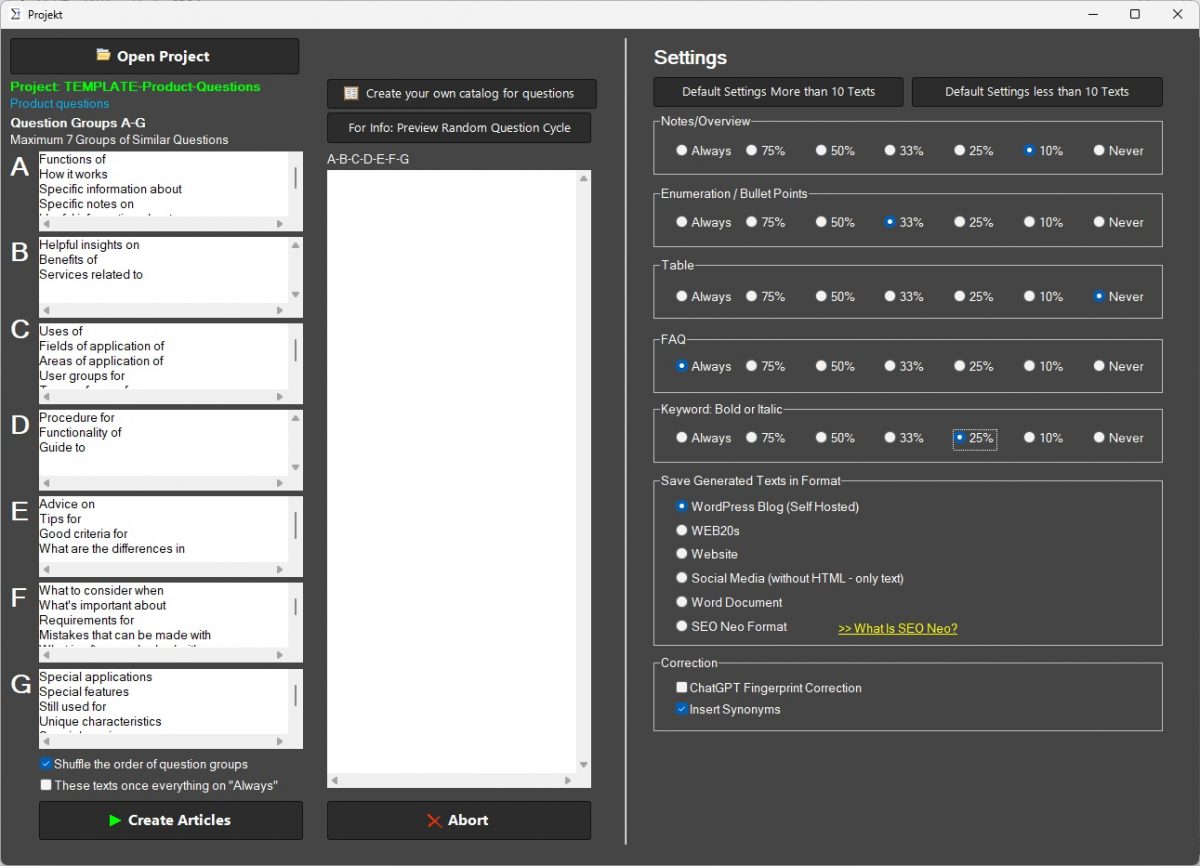
Product Comparison Tool for Affiliate Marketers

Publishing affiliate content gets harder when every post has to start with a blank document, a pile of notes, and a long list of products to sort through. Readers want fast answers, clear differences, and a simple path to the right pick. This product helps you turn research into useful comparison articles, buyer guides, versus posts, and product roundups that are easier to read and easier to act on.

Instead of wrestling with structure, you can build content around real buying questions, product features, pricing points, use cases, and common objections. That means less time organizing raw information and more time shaping content that helps visitors decide. For affiliate publishers, that matters because people searching for product comparisons are usually closer to a purchase than general information seekers.

Turn Product Research Into Buying Guides Faster

Affiliate content works when it reduces confusion. A good comparison article does not bury the answer. It shows what matters, who each option fits, where the trade-offs are, and what a shopper should notice before clicking through.

This product is built to help you move from scattered notes to a structured draft with a clear introduction, side-by-side points, pros and cons, table-ready data, and buyer-focused FAQ content. It supports product roundups, direct matchups, alternatives posts, and review-driven comparisons without forcing you into the same layout every time.

Turn Notes Into Structured Drafts

Research for affiliate posts usually comes from product pages, personal testing, screenshots, spec sheets, support docs, and user questions. Pulling that together takes time. The software helps you organize that material into readable sections so your final article feels focused instead of patched together.

That is useful when you need to compare features, pricing, beginner fit, advanced use, setup difficulty, support options, or long-term value. Readers do not want a wall of text. They want a clear decision path.

Why Comparison Content for Affiliate Sites Drives Better Buying Decisions

People rarely search for a comparison because they are curious in a general way. They search because they are close to choosing. They want to know which product is better for their budget, skill level, use case, or goals. When your content answers those questions in plain language, it becomes more useful and more persuasive at the same time.

Comparison content for affiliate sites helps bridge the gap between research and action. It gives visitors a simple way to understand what changes from one option to the next. That can reduce hesitation, keep readers on the article longer, and support more informed clicks to merchant pages.

Comparison Content for Affiliate Sites and Reader Trust

Trust grows when a comparison feels balanced. Readers can tell when a post hides weaknesses or turns every product into the same recommendation. This tool helps you present strengths, limits, differences, and ideal use cases in a format that feels easier to follow.

That matters for affiliate publishing because a cleaner comparison can make your recommendations feel more credible. You are not pushing a product with vague praise. You are helping readers weigh real options.

Write Clear Product Matchups Without Starting From a Blank Page

One of the biggest slowdowns in affiliate publishing is structure. Even experienced writers lose time deciding what to say first, how to sort features, where to add pros and cons, and how to keep the article from repeating itself.

This product gives you a practical starting point. You can shape direct “A vs. B” comparisons, broader “best for” roundups, or category-level buying guides with sections that match how shoppers think. That includes intros that frame the decision, breakdowns that separate key differences, and closing recommendations that point readers toward the best fit instead of a generic winner.

Keep Product Differences Clear

Many comparison posts fail because they list features without explaining why those features matter. A tool may have more templates, more settings, or more integrations, but that only matters if the reader knows how it affects cost, setup, speed, or day-to-day use.

This software helps convert technical or scattered details into buyer language. Instead of dumping information, you can present what each difference means for beginners, advanced users, budget-focused shoppers, or people who want a faster setup.

How Comparison Content for Affiliate Sites Helps Readers Choose With More Confidence

Strong affiliate content does more than describe products. It reduces uncertainty. Readers want to know which option makes sense for their situation, not just which one has the longest feature list. That is where comparison content for affiliate sites becomes valuable.

By framing the decision around fit, trade-offs, and likely outcomes, your article becomes easier to trust. A visitor can move from “I am still comparing” to “I know which option matches what I need.” That kind of clarity is useful for software, services, subscriptions, online tools, and physical products.

Comparison Content for Affiliate Sites and Commercial Intent

Decision-stage readers use queries like “best,” “vs,” “alternative,” “review,” and “comparison” because they are actively evaluating choices. They are not looking for general background. They want help making a purchase decision.

This product is designed around that stage of the journey. It helps create content that matches buyer intent with sections readers expect to see: use cases, feature breakdowns, pricing notes, pros and cons, best-for summaries, and direct recommendations.

Create Comparison Tables, Pros and Cons, and Buyer FAQs

Some readers scan before they read. Others jump straight to the table. Many go to the FAQ to check one last concern before deciding. That means comparison content needs several content formats working together, not just paragraphs.

This product helps you build those high-value sections with less manual effort. You can create a readable feature table, write pros-and-cons blocks that show trade-offs clearly, and add FAQ answers that deal with common buying concerns. The result is content that serves fast scanners and careful readers at the same time.

Create Table-Ready Product Breakdowns

A good comparison table helps readers spot key differences quickly. That may include price, trial terms, supported platforms, ease of use, support, standout features, and ideal user type. When those points are clear, the article becomes easier to scan and easier to remember.

With the right structure, your table becomes part of a broader buying guide rather than a disconnected chart. Readers can scan first, then continue into explanations that add context.

Use Pros and Cons To Show Trade-Offs

Pros-and-cons sections help when products are close competitors. They give readers a fast sense of where each option wins and where it may fall short. That makes the comparison feel more honest and easier to trust.

The software supports this by shaping balanced summaries instead of one-sided praise. For affiliate sites, that is important because a realistic comparison usually helps readers make a decision with less friction.

Who Uses Comparison Content for Affiliate Sites

This product fits affiliate publishers who make buying guides, review posts, alternatives articles, and direct matchup content. That includes solo site owners, niche bloggers, content teams, review-focused publishers, and creators building monetized resource sites.

It is useful for beginners who need a clearer structure and for experienced affiliates who want a faster workflow. If your content relies on helping people compare products before they buy, the software is built around that exact job.

Comparison Content for Affiliate Sites for Roundups and Versus Posts

Not every affiliate article follows the same pattern. Some posts compare two products head-to-head. Others sort five or ten options by use case, budget, or skill level. Some mix review insights with category recommendations.

This software supports those formats by helping you shape the content around the decision itself. Whether you are writing “best for beginners,” “A vs. B,” or “top alternatives,” the goal stays the same: give readers a cleaner path to the right choice.

Build Content Around Real Buyer Questions

The strongest affiliate content answers the questions readers already have. Which one is easier to use? Which one costs less over time? Which one is better for beginners? Which option handles a specific task better? Which choice has fewer limitations?

This product helps turn those questions into structured sections instead of scattered notes. That creates a more readable article and a more useful decision framework. Readers should feel like the content understands what they are trying to solve.

Answer Questions That Move People Closer To a Decision

Generic descriptions do not help much when the shopper is already comparing options. They need direct answers, plain wording, and a visible reason to choose one product over another. That is why buyer questions should shape the article from the start.

With a better question-driven structure, your article can guide readers through setup, pricing, fit, support, performance, and long-term value without drifting into filler.

What To Look for in Comparison Content for Affiliate Sites Software

Not every writing tool fits affiliate publishing. Some are too generic. Others can generate text but do not help with the comparison logic that readers need when they are close to buying. Comparison content for affiliate sites software should support clarity, structure, and buyer-focused writing.

Look for a product that helps organize feature differences, shape direct matchups, write pros and cons, support comparison tables, and turn buyer questions into useful FAQ content. It should also help reduce repetition so each article feels specific to the products being compared.

Comparison Content for Affiliate Sites for Product Tables

Tables matter because they give readers a quick visual summary. Still, a table alone is not enough. Buyers also need explanation, context, and guidance on which product fits which kind of user.

A useful tool supports both jobs: fast scan content and deeper reading sections. That combination makes comparison posts more practical for visitors who want speed and for visitors who want detail before they click.

Use Cases for Review Posts, Versus Pages, and Roundups

Affiliate publishers usually need more than one content style. A versus post helps when two close competitors dominate a category. A roundup helps when shoppers want several alternatives. A review-led comparison works when one product needs more explanation before it can be compared fairly.

This product can support all three by helping you shape the content around intent, not just format. That makes it easier to publish articles that fit the search, match the buying stage, and give readers a stronger reason to keep reading.

Use It for Software, Services, and Consumer Products

The same comparison framework can work across many affiliate categories. Software buyers care about workflow, setup, and pricing. Service buyers care about support, reliability, and terms. Physical product buyers may focus on features, durability, and value.

When the writing process starts from the buyer decision instead of a fixed template, the content becomes easier to adapt across niches while still staying clear and useful.

WordPress AI Content Generator for SEO Content

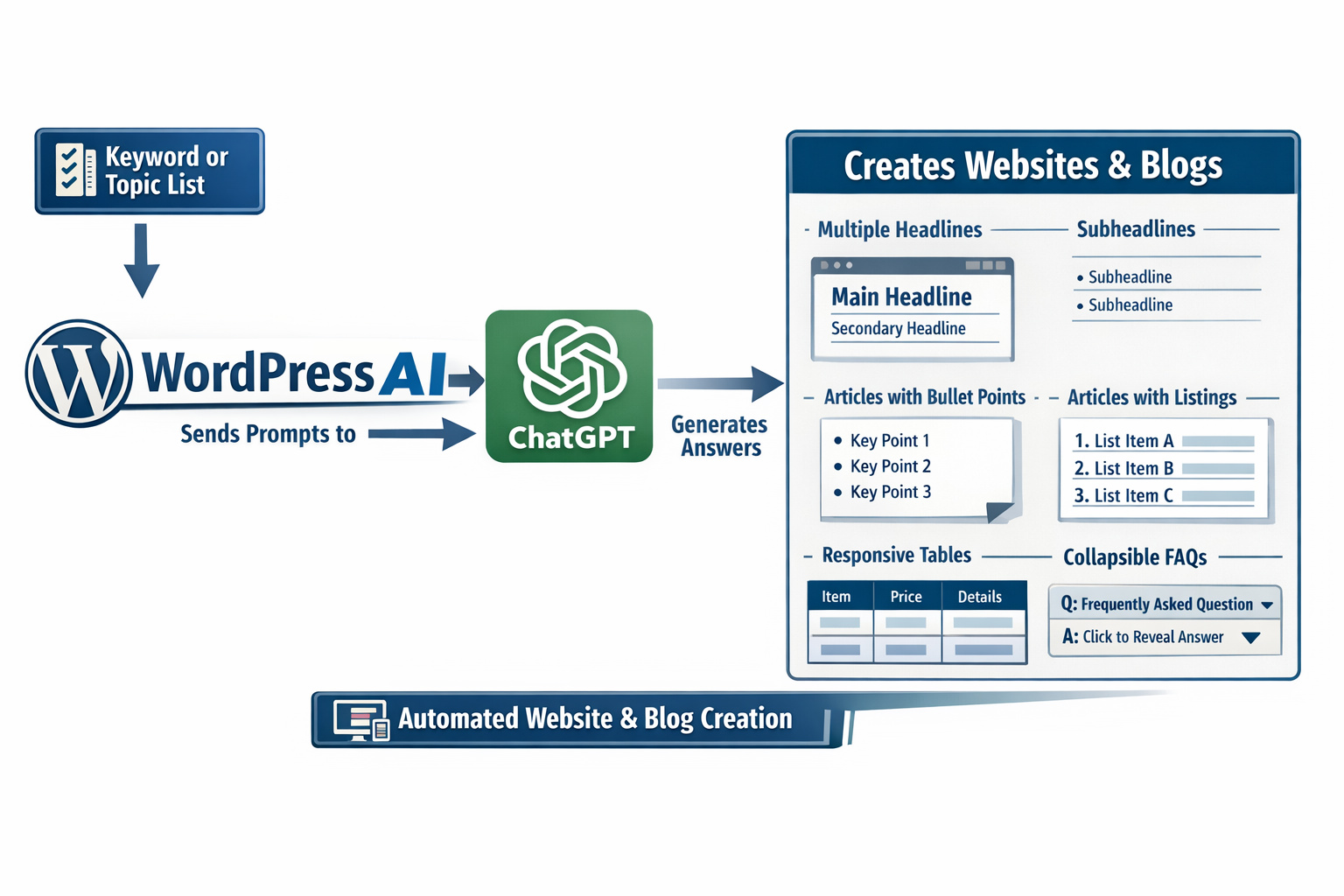
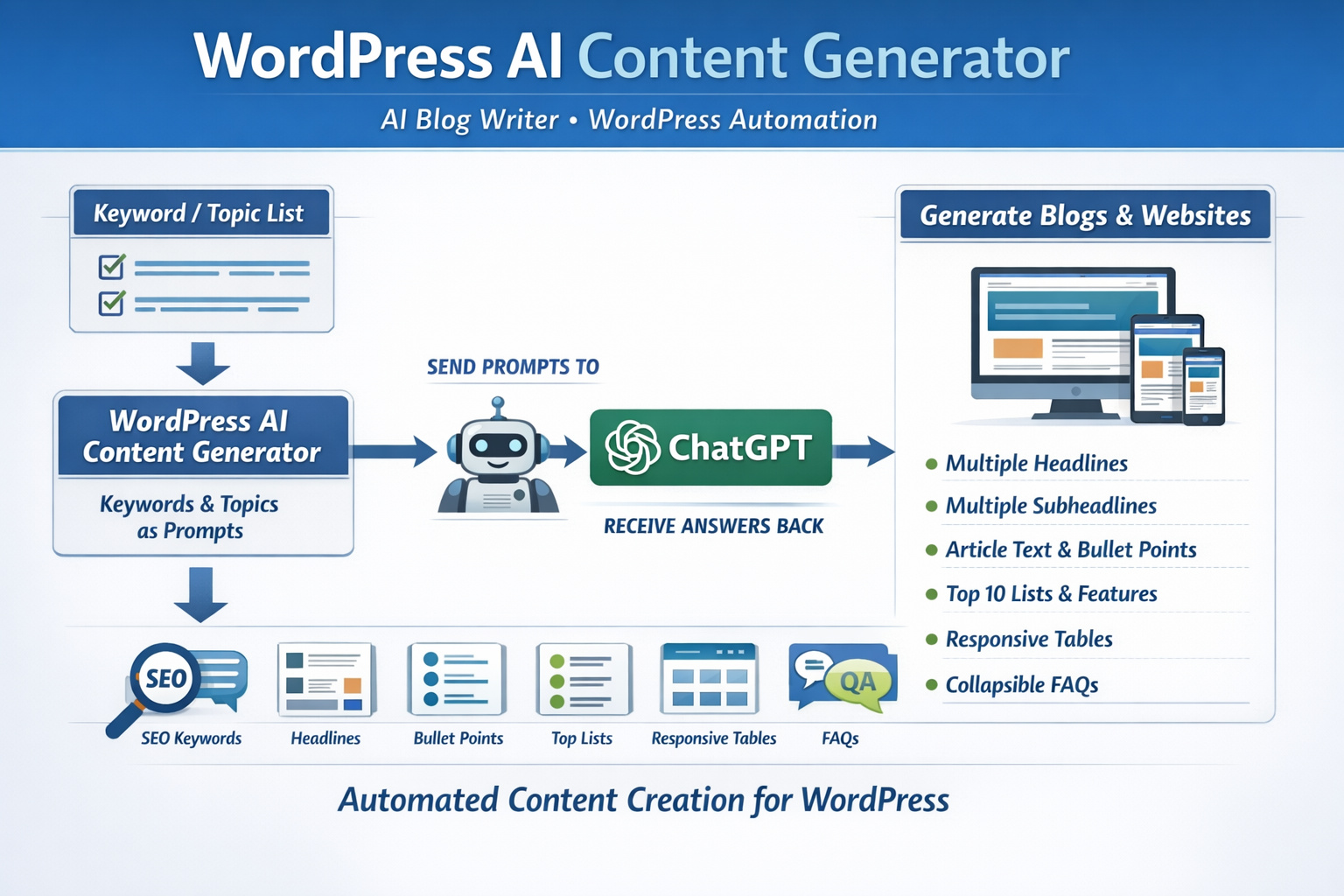
WordPress AI Content Generator Chart

A busy content site does not slow down because ideas are missing. It slows down because turning one keyword into a useful post takes more time than expected. With a faster path from topic to draft, a WordPress AI content generator helps while you stay in charge of the final wording, factual checks, and publishing decisions.

Built for self-hosted WordPress users, bloggers, and affiliate marketers, this software helps you create structured articles that are easier to finish. Instead of wrestling with outlines, formatting, meta descriptions, FAQs, and comparison tables one piece at a time, you can move through the writing process with a clear workflow that supports planning, drafting, and editing.

The result is simple: less friction, more finished drafts, and more time to shape posts around your real opinions, product knowledge, and niche expertise.

Write More Without Losing Control

Publishing regularly is hard when every post starts from zero. With a WordPress AI content generator, you can get past the slowest stage first. You can begin with a keyword, a topic, or a writing angle and turn that into a working draft with sections that already make sense.

Start With a Keyword, Not a Blank Screen

Many site owners know what they want to rank for, but the first draft still takes too long. The software turns a target term into a usable structure with headings, subheadings, and draft copy that gives you something to work with right away. That matters when you want a repeatable writing process instead of a stop-and-start routine.

Keep Your Voice and Final Judgment With a WordPress AI Content Generator

The draft is the starting point, not the final word. You can review the language, add personal experience, remove weak phrasing, check facts, and shape the post to fit your brand. That makes this WordPress AI content generator valuable for people who want speed without handing away editorial control.

WordPress AI Content Generator SEO Texts

Why a WordPress AI Content Generator Fits Real Publishing Work

Content tools are useful when they match what actually happens before a post goes live. A self-hosted WordPress user usually needs more than a text box. The work includes choosing a keyword, planning the angle, creating sections that answer the search, adding FAQs, preparing metadata, and formatting the post so readers can scan it quickly.

Built for Self-Hosted WordPress Users

Self-hosted WordPress gives you control, but that control also means more responsibility. You plan the post, handle formatting, guide the SEO direction, and decide what gets published. This software supports that environment by helping you move through each drafting stage with fewer delays.

WordPress AI Content Generator for Bloggers and Affiliate Sites

Bloggers need a tool that helps them keep publishing. Affiliate marketers need a tool that helps them create review posts, comparison posts, alternatives, and supporting informational content. The WordPress AI content generator fits both because it helps shape structured drafts around a clear topic and a clear visitor need.

Turn Search Intent Into Structured Posts

Ranking starts with relevance. People do not search for words alone. They search with a purpose. Some want an explanation. Some want to compare options. Some want help making a decision. Good content follows that purpose from the headline down to the last section.

Match the Query Before You Write

When you know whether a keyword is informational, commercial, or comparison-driven, writing becomes easier. The software helps you build around that goal. You can create a guide for readers who want to learn, a review for readers who are evaluating products, or a comparison for readers who are close to choosing.

WordPress AI Content Generator for Reviews, Comparisons, and Guides

A WordPress AI content generator is especially useful when the article needs structure. Reviews need a clear flow. Comparison posts need easy-to-scan sections. Guides need straightforward answers and logical sequencing. With a better first draft, you spend less time fixing the skeleton of the article and more time improving the substance.

Create Content Elements That Readers Actually Use

Readers skim before they commit. They look for direct answers, clean formatting, and quick ways to compare information. Dense text slows that down. A post becomes easier to trust when the format helps the reader move through it without effort.

FAQs, Tables, and Meta Descriptions in Less Time

Useful content is not only about paragraphs. You may need a short FAQ block to answer obvious questions. You may need a table to compare features or summarize details. You may need a meta description that is ready for editing before publishing. This software helps generate those supporting elements as part of the workflow instead of leaving them as separate chores.

WordPress AI Content Generator for Cleaner Post Structure

A WordPress AI content generator can help you create headings, subheadings, FAQs, and tables that make posts easier to scan on desktop and mobile. That matters for affiliate content, product roundups, blog tutorials, and any article where readers want answers fast.

Plan Topics Before the Writing Starts

Strong publishing habits come from having the next topic ready before you finish the current one. Keyword research helps you build that pipeline. Instead of guessing what to write next, you can create a list of terms and move from planning to draft creation with fewer interruptions.

Use Keyword Research to Build the Next Draft

Some site owners lose time before writing even begins. They know they need content, but they do not know which term should come next. The software helps with keyword research so you can identify relevant topics, organize them by intent, and turn them into article ideas that match your niche.

WordPress AI Content Generator for a Steady Content Pipeline

A WordPress AI content generator is more useful when it supports the full writing cycle. Research a term, choose the angle, generate a structure, draft the post, edit it carefully, and move to the next topic. That kind of rhythm is valuable for bloggers building traffic and affiliate marketers creating supporting content around buying-intent keywords.

Publish With Less Friction

Publishing speed is not just about writing faster. It is about removing the little delays that keep a draft from becoming a finished post. Metadata, structure, question blocks, and comparison elements all take time when you do them manually from scratch every time.

Move From Draft to Edited Post Faster

With a structured draft in place, the editing stage becomes more focused. You can check accuracy, refine the tone, trim repetition, and add examples or screenshots without first rebuilding the article. That saves time where it matters most: the gap between idea and finished content.

WordPress AI Content Generator for Repeatable Output

A WordPress AI content generator helps create a repeatable process. That is important when you publish weekly, manage several content projects, or run a site where every delay pushes the next article further back. Predictable structure can turn content production into a system instead of a constant scramble.

Who This Software Is Best for

Not every content tool fits every workflow. This one is a practical fit for people who publish on self-hosted WordPress and want better drafting support without losing control over the final article.

Bloggers Who Need Consistency

Writers who run blogs on evenings, weekends, or limited work hours need a simpler path to finished drafts. The software helps reduce time spent on structuring and routine content elements so more posts can move forward without feeling rushed or disorganized.

WordPress AI Content Generator for Affiliate Marketing Workflows

Affiliate sites usually depend on clear content types: reviews, alternatives, roundups, comparisons, and supporting informational articles. A WordPress AI content generator helps create those content foundations faster, which makes it easier to focus on product research, proof, screenshots, and decision-focused editing.

Benefits That Matter Day to Day

The main value is not flashy language. It is practical output. You save time at the blank-page stage. You get article structures that are easier to edit. You can create FAQs and tables without building them manually every time. You can draft meta descriptions when the post is close to ready. You can use keyword research to plan what comes next.

For self-hosted WordPress users, that means a smoother path from idea to published article. For bloggers, it means more consistency. For affiliate marketers, it means a better starting point for buyer-focused content. For anyone managing a growing site, it means fewer stalled drafts and more opportunities to publish on schedule.

FAQ About the Product

What does a WordPress AI content generator actually create?
It can create draft articles based on a keyword or topic, along with structure such as headings, subheadings, FAQs, tables, and supporting SEO text like meta descriptions. You still review and edit the result before publishing.
Can I use it for affiliate posts and product comparisons?
Yes. It is well suited for review posts, alternatives, comparison articles, roundup content, and supporting informational posts that help readers move toward a decision.
Is it useful for self-hosted WordPress users?
Yes. It fits users who manage their own WordPress sites and want help with drafting, content planning, and article structure while keeping control over the final post.
Can it help with keyword research before I write?
Yes. You can use keyword research to find topic ideas and related terms, then turn those into structured draft posts that match the intent behind the search.
Does it create FAQs and tables for blog posts?
Yes. It can generate FAQ blocks and table-ready content, which is useful for answer-focused articles, comparison posts, and pages that need quick scannability.
Will I still need to edit the content?
Yes. Editing remains important for factual checks, tone, product accuracy, examples, screenshots, and any opinion or experience you want the article to reflect.
Can it create meta descriptions for SEO content?
Yes. It can draft meta descriptions so you have a starting point that you can revise to match the article focus and your preferred wording.
How does a WordPress AI content generator help me stay on topic?
It helps by starting with a keyword or topic and building a structured draft around that focus, which reduces drift and makes the article easier to shape around a clear search intent.

Get More Finished Drafts With a WordPress AI Content Generator

A WordPress AI content generator works best when your goal is simple: publish useful content more consistently without lowering your standards. It helps turn keywords into structured articles, supports planning with keyword research, adds FAQs and tables where they make sense, and reduces the time spent on repetitive drafting work.

For self-hosted WordPress users, bloggers, and affiliate marketers, that creates a workflow that is easier to keep going. You stay in charge of the final article. The software helps you get there with less resistance and a stronger starting point for every post.

AI Blog Writer for Content

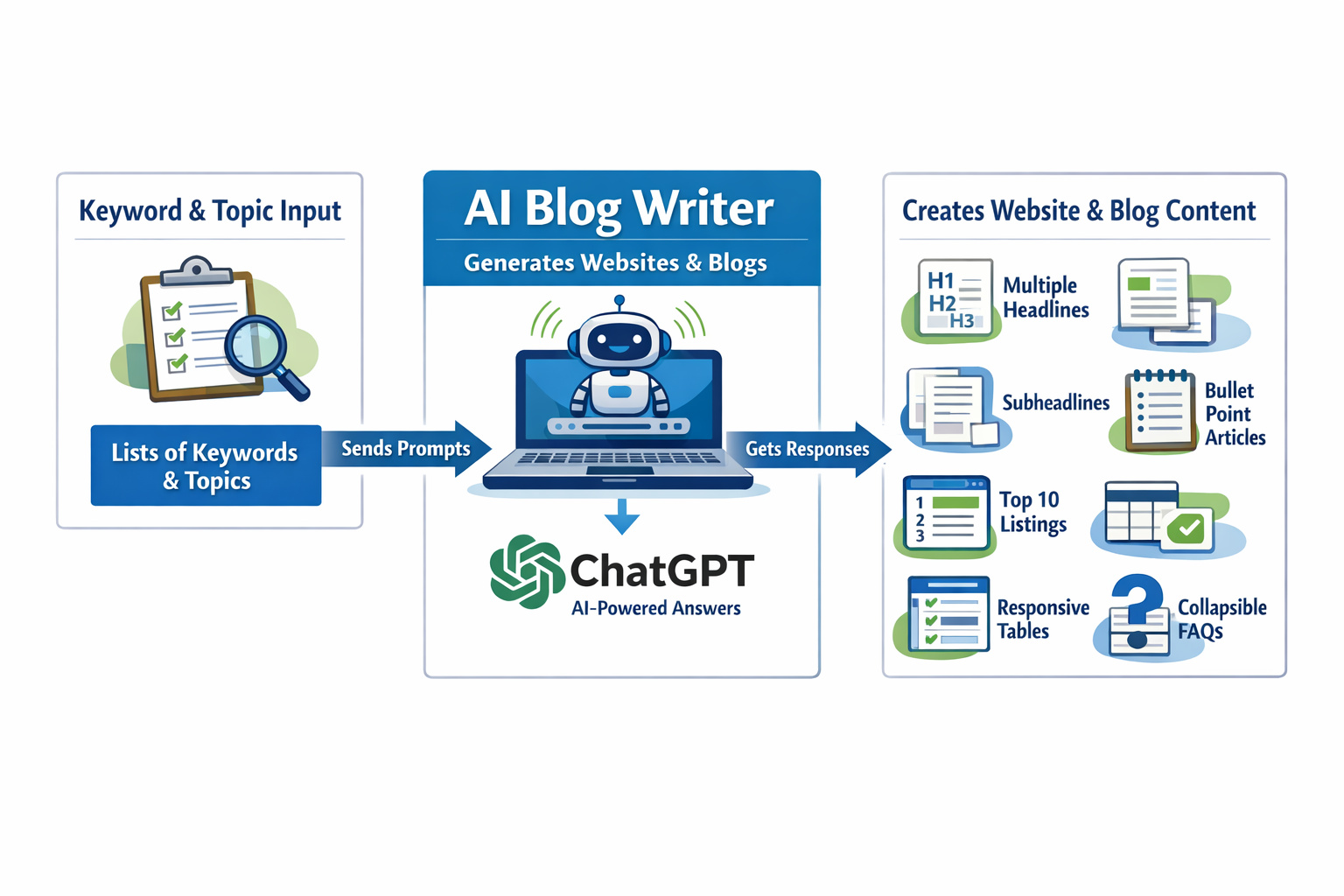
AI Blog Writer Flow Diagram

Self-hosted WordPress users can use AI blog writer to turn keyword ideas into structured drafts that are easier to edit, optimize, and publish. Bloggers, affiliate marketers, and content-focused site owners use it to move from topic planning to article creation with less friction. Instead of starting with an empty editor, you begin with a draft shaped around search intent, readable structure, and the practical questions readers want answered.

Clear writing matters when traffic depends on useful content. A strong post needs a focused topic, useful subheadings, search-friendly wording, and an article flow that keeps the reader moving. At that starting point, AI blog writer helps create a better foundation. It can generate SEO texts, build articles from keywords, suggest meta titles, and add expandable FAQ sections that fit common publishing needs for WordPress blogs and affiliate sites.

For site owners who publish on a schedule, consistency matters as much as speed. Ongoing content production becomes easier with AI blog writer without forcing the same flat wording into every topic. You can shape the direction, refine the angle, and keep each draft aligned with the audience you want to reach.

Write Blog Content Faster Without Losing Clarity

Publishing pressure builds quickly when you manage your own site. New articles need planning, structure, and enough depth to compete. By turning a keyword or topic into a working article framework, AI blog writer reduces the time spent on first drafts. That means less time staring at a blank screen and more time improving the parts that matter most, such as examples, product opinions, and final edits.

Drafting speed only matters when the output still reads well. Readers do not stay for stiff, confusing copy. They stay for content that answers the query early, organizes the topic in a logical way, and makes the next step obvious. That is why AI blog writer focuses on readable sections, useful wording, and article flow that fits how blog visitors scan a page.

Turn Keywords Into Drafts With a Clear Direction

A keyword by itself does not create a useful post. It needs context, structure, and intent. To fill that gap, AI blog writer helps turn a search term into article sections built around common reader needs such as definitions, comparisons, steps, recommendations, and objections. This is helpful for bloggers building traffic articles, affiliate marketers writing buying-focused posts, and self-hosted WordPress users who want a dependable content workflow.

When the draft starts in the right direction, editing becomes simpler. Instead of rebuilding the post from the ground up, you refine wording, add insight, and tighten the message for your audience.

AI Blog Writer for Content

Why an AI Blog Writer Fits WordPress Publishing

WordPress users usually need more than plain text. They need content that is easy to copy into the editor, easy to scan on mobile devices, and easy to adapt to a specific site style. That kind of workflow is supported well by AI blog writer. It helps produce structured article drafts with headings, reader-friendly sections, and expandable FAQs that fit blog publishing needs without extra tool switching.

For bloggers and affiliate site owners, production is rarely about one post. It is about keeping momentum across many topics. That is where a reliable workflow matters. Ongoing publishing is easier with AI blog writer because it helps you create search-focused drafts, organize content around reader intent, and prepare supporting elements such as meta titles and question-based sections.

Keep Articles Easy to Edit and Easy to Post

Many writing tools can generate text, but raw text alone does not solve publishing problems. A usable structure from the start is what AI blog writer gives you. Shorter paragraphs, relevant subheadings, and organized answers make the draft easier to review before it goes live. That matters when you publish often and need a process that saves time without making editing harder.

WordPress users also benefit from content that feels natural inside blog posts, product guides, and informational articles. The goal is not just to create text. The goal is to create article material that fits the way real blogs are built.

Create SEO Content That Matches Reader Intent

Traffic does not come from adding keywords at random. It comes from meeting intent. Someone searching for advice, comparisons, or buying guidance expects a direct answer, not filler. With that in mind, AI blog writer helps shape article drafts around that expectation. It supports SEO copywriting by focusing on topic relevance, readable wording, and sections that answer real questions instead of circling around them.

For example, a buyer-focused keyword may need a benefits section, a comparison angle, and a practical FAQ. A broader informational keyword may need definitions, examples, and steps. In those cases, AI blog writer helps frame the article according to that goal, which gives your edits a stronger starting point.

Build Articles Around Questions, Comparisons, and Buyer Needs

Strong blog content usually follows one of a few useful paths. It explains a topic, compares options, solves a problem, or helps a reader decide. Those paths are supported by AI blog writer by turning a simple input into a fuller draft. That is useful for affiliate content, evergreen blog posts, niche site articles, and SEO-driven content planning.

Writers still control the final message, but the draft begins with a clearer shape. That can reduce wasted time and lead to content that feels more focused from the first round of edits.

How an AI Blog Writer Supports Repeat Publishing

One of the biggest content problems is inconsistency. A site starts with energy, then slows down because every article requires the same repetitive setup work.

The AI blog writer helps remove part of that friction. Instead of rebuilding an outline, article flow, and SEO basics every time, you can start with a draft that already includes a practical structure.

This supports a more stable publishing routine. Bloggers can create post ideas from keywords, affiliate marketers can build product-focused article drafts, and WordPress users can keep the writing process moving even when the topic list grows.

Save Time on Titles, Structure, and FAQ Writing

Repetitive tasks take more time than most site owners expect. Writing a title, checking the article structure, and adding FAQ content for every new post can slow the entire content cycle. Help with those steps comes from AI blog writer through generated meta title ideas, structured headings, and expandable FAQ sections that support article completeness.

That does not replace review. It gives you a cleaner first version to work from. You keep control over wording, claims, product references, and factual checks while avoiding the slowest part of writing from scratch.

Built for Bloggers, Affiliates, and Site Owners

Different users publish for different reasons, but they often face the same bottlenecks. Bloggers need article ideas and readable structure. Affiliate marketers need buying-intent content that is clear and persuasive without sounding forced. Self-hosted WordPress users need a workflow that fits directly into the tools they already use. Those use cases are exactly what AI blog writer is built around.

It works well for content creators who want a dependable starting draft rather than a vague writing prompt. That makes it suitable for niche sites, monetized blogs, product roundups, informational guides, and content-driven WordPress projects.

Use One Workflow Across Multiple Content Types

Not every post has the same job. Some articles target broad informational searches. Others target comparison terms, product-related queries, or problem-solving topics. One writing process across those formats is easier to maintain with AI blog writer. You can start from a keyword, shape the angle, create the article draft, and prepare supporting SEO elements without breaking your routine.

This is especially useful for people who manage their own content calendar and need a reliable way to move ideas into publishable drafts on a steady basis.

AI blog writer Features That Support Real Publishing Work

Useful software solves concrete work, not abstract marketing promises. Real content production tasks are where AI blog writer stays focused. It helps create SEO texts, turn keywords into article drafts, suggest meta titles, and build expandable FAQs. These are the pieces many site owners need every week when they create new blog posts or refresh older articles.

The value is practical. Instead of juggling several disconnected steps, you get help with the writing tasks that slow publishing down the most. That can make content planning more manageable and article production more consistent over time.

Create Meta Titles, FAQs, and Structured Sections

Meta titles help shape search snippets. FAQ blocks help cover follow-up questions. Structured sections help readers find information faster. Support for all three comes from AI blog writer, which makes it useful for SEO-focused publishers who need more than a block of generic text. Better organization can also make the article easier to revise, especially when you want to tighten the wording or remove weak sections before publishing.

Because the software starts from your topic and keyword direction, the output stays tied to the actual article goal instead of drifting into unrelated filler.

Choose an AI blog writer for Better Content Flow

Good content feels easy to read, but that usually comes from strong structure and deliberate editing. That foundation is what AI blog writer helps create. It gives you a draft with clearer direction, search-focused relevance, and sections that are easier to shape into a finished post. For self-hosted WordPress users, that can mean a smoother path from content idea to published article.

It also supports content teams of one. Many bloggers and affiliate marketers manage topic planning, writing, editing, and posting on their own. A dependable AI blog writer can reduce the weight of first-draft creation and leave more time for quality control, personal insight, and final polishing.

Get More Control Over Tone, Format, and Output

The first draft should not lock you into one style. It works best when AI blog writer gives you structure without taking away control. You can review wording, refine the angle, adjust the tone, and make the article fit your site voice. That is important for publishers who want efficiency but still care about quality and consistency.

With a stronger starting draft, you spend less energy building the skeleton of the article and more energy improving what readers actually notice: clarity, usefulness, and trust.

Frequently Asked Questions About AI blog writer

How Does an AI blog writer Help With SEO?
It helps create drafts around keywords, search intent, clear headings, and useful supporting elements such as meta titles and FAQs. It does not guarantee rankings, but it can make the writing process more organized and search-focused.
Can an AI blog writer Create Articles From Keywords?
Yes. AI blog writer can use a keyword or topic as the starting point for a structured draft. That gives you a working article outline and body copy that you can review, improve, and publish.
Is an AI blog writer Useful for Self-Hosted WordPress Sites?
Yes. It is useful for self-hosted WordPress users who want a smoother content workflow and drafts that are easier to adapt inside a blog editor.
Can I Use an AI blog writer for Affiliate Marketing Content?
Yes. It can help create buying-focused article drafts, comparison-style sections, and question-based content that suits affiliate publishing. Final product claims and recommendations should still be reviewed carefully.
Does an AI blog writer Create Meta Titles?
Yes. AI blog writer can suggest meta title options based on the article topic and keyword direction, which helps speed up on-page SEO work.
Can an AI blog writer Add Expandable FAQs?
Yes. It can generate FAQ content that fits common reader questions and supports a cleaner article structure for longer posts.
Will I Still Need to Edit the Content?
Yes. Review is still important for accuracy, tone, product details, and original insight. The software helps create a strong starting draft, not a final substitute for editorial judgment.
Who Gets the Most Value From an AI blog writer?
Bloggers, affiliate marketers, and self-hosted WordPress site owners who publish regularly usually get the most value because they repeat the same drafting and SEO tasks across many topics.