WordPress AI Writer for Self-Hosted Blogs

WordPress AI Writer

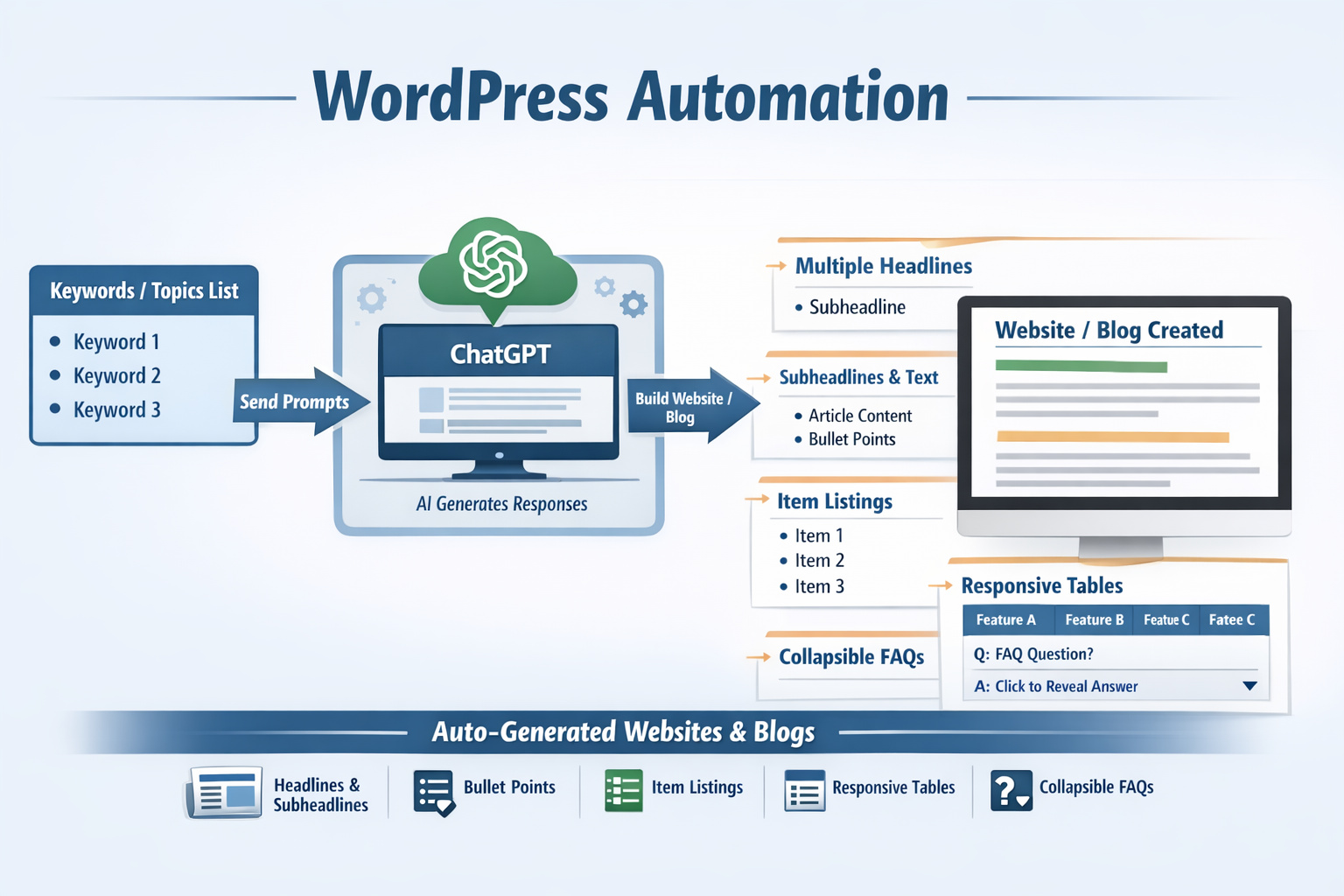
When publishing schedules slip, a WordPress AI writer can give bloggers and site owners a faster way to turn topics into usable article drafts. Instead of starting with a blank editor every time, you can move from keyword ideas to structured content that is easier to review, refine, and publish on a self-hosted WordPress site.

For affiliate marketers, niche publishers, and independent bloggers, the real value is not flashy automation for its own sake. What matters is a steadier flow of articles, clearer formatting, and less time spent repeating the same writing tasks. With this kind of workflow, the WordPress AI writer supports content production in a way that fits real publishing routines.

Across multilingual projects, a WordPress AI writer can also reduce friction when you need drafts in English, German, Spanish, French, or Italian. That makes it easier to serve more than one audience without rebuilding your process for each language version.
WordPress AI Writer

Create More Publishable Content Without Slowing Down Your Workflow

Content calendars usually break down for a simple reason: drafting takes longer than expected. Research may be ready, keywords may be chosen, and the topic may be clear, but the first version still takes time to shape. In that moment, a WordPress AI writer helps by turning topic prompts into readable article structures you can work with.

For self-hosted WordPress users, speed matters most when it leads to usable output. That means paragraphs that already follow a logical order, headings that support scanning, and content blocks that are suitable for blog-style reading. A useful draft lowers the amount of cleanup you need before a post is ready for final review.

Writers working on affiliate projects also need content that can present comparisons, explain features, and answer common buyer questions. With the right setup, a WordPress AI writer helps produce article drafts that are easier to adapt for product roundups, how-to posts, category pages, and long-form informational content.

Why a WordPress AI Writer Fits Modern Blog Publishing

Modern blog publishing is not just about writing more words. Search-focused content needs structure, relevance, readability, and consistent output. Because of that, many site owners look for tools that reduce routine work while still leaving room for editing and editorial control. In that workflow, a WordPress AI writer becomes useful as a first-draft engine rather than a replacement for judgment.

For smaller content teams and solo publishers, another advantage comes from consistency. Topic clusters, affiliate reviews, supporting articles, and informational posts all require repeated formatting patterns. When a WordPress AI writer can create articles with tables and organized sections, the content process becomes easier to repeat across many topics.

Write From Keywords Instead of Blank Pages

Keyword-based writing is easier when you do not have to invent the whole structure from nothing. With the right prompt, a WordPress AI writer can start from a search term, topic phrase, or article idea and shape that input into a more complete draft. You still control the angle, facts, and final message, but the starting point arrives faster.

This is especially useful for bloggers who keep long topic lists and want to turn them into draft articles in a more reliable way. Instead of losing time between planning and writing, the WordPress AI writer helps bridge that gap with article-ready structure.

Keep Formatting Useful for Readers With a WordPress AI Writer

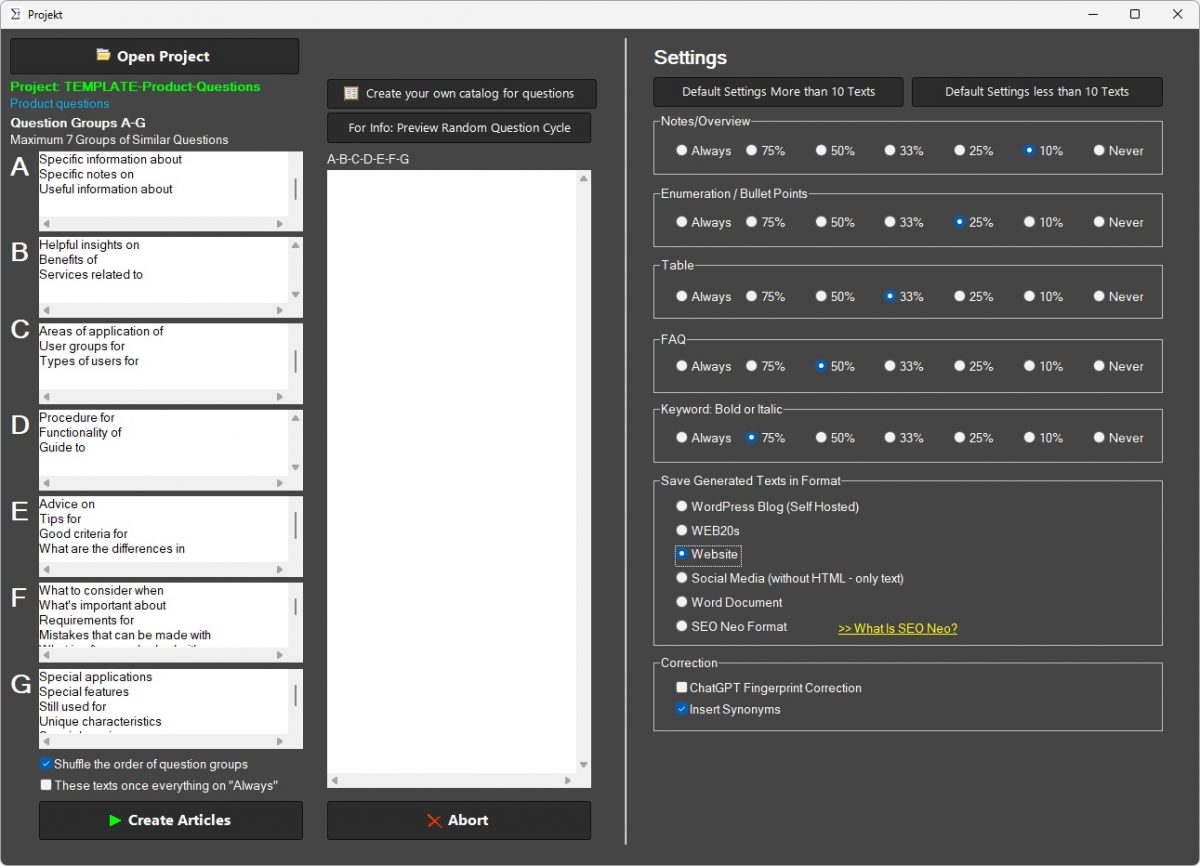
Good blog content is not only about paragraphs. Readers also need comparison points, quick answers, and visual clarity. For that reason, a WordPress AI writer becomes more practical when it can generate tables, organized sections, and FAQ-style content blocks that fit a reading pattern people already expect on product and advice pages.

On smaller screens, table formatting can become a problem if content is not prepared carefully. When responsive tables are part of the writing output, a WordPress AI writer supports a better reading experience for visitors on phones and tablets as well as desktops.

Built for Bloggers, Niche Sites, and Affiliate Projects

Not every content tool is built around WordPress publishing needs. A generic text generator may produce words, but a WordPress-focused product should support the way blog content is actually planned and used. For self-hosted sites, that means article drafts shaped for publishing workflows, search-focused writing, and repeatable output across many posts.

Affiliate marketers usually need content that compares options, explains use cases, and answers practical buyer questions. Bloggers running niche sites need enough content depth to cover related subjects without spending all week drafting. In both cases, a WordPress AI writer gives you a faster route from idea to editable article.

For single-site publishers, the gain may be consistency. For users running several projects, the gain may be output volume across many topics. In either case, the value comes from reducing repetitive writing effort while keeping the final review in your hands.

What a WordPress AI Writer Can Produce

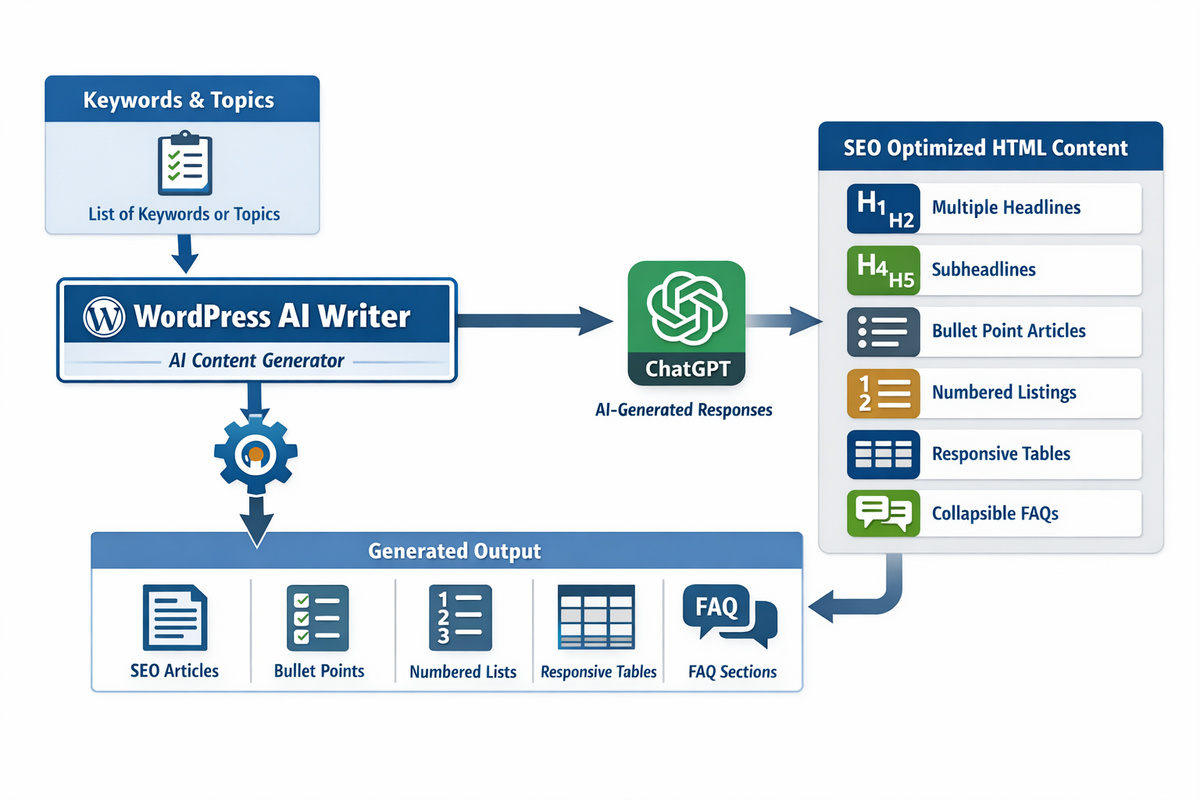
A broad content workflow becomes easier when one system can support more than one article type. Depending on your setup, a WordPress AI writer can help generate informational posts, blog articles, product-focused write-ups, SEO-oriented copy, and content blocks such as tables or FAQs that make articles easier to scan.

That matters because many WordPress sites do not need only one article format. A useful content tool should support list-style content, comparison-based writing, and structured informational posts without pushing you into one rigid template every time.

Articles in Five Languages

International publishing gets complicated when each language needs a separate drafting process. With support for English, German, Spanish, French, and Italian, a WordPress AI writer gives site owners a practical route for multilingual content planning. That can help bloggers reach new markets or manage region-specific versions of similar topics.

For users working across language variants, the gain is not just more output. The main gain is process control. A WordPress AI writer can keep article creation closer to one repeatable workflow even when the final content needs to serve several language audiences.

SEO Copy, Tables, and Structured Drafts With a WordPress AI Writer

SEO writing usually works better when the article already has a clear frame. That includes headings, topical relevance, readable paragraphs, and content blocks that help visitors find what they need quickly. In that setting, a WordPress AI writer supports SEO copywriting by giving you drafts that are easier to refine around search intent.

Table creation adds another practical layer. On comparison posts, software roundups, feature breakdowns, and affiliate articles, tables can make complex information easier to read. When a WordPress AI writer includes table-ready content, you save time on one of the more tedious parts of article formatting.

  • keyword-based article drafts
  • SEO-oriented blog copy
  • responsive table content
  • multilingual text generation
  • structured sections for longer posts
  • FAQ-style answers for buyer questions

How the Writing Process Saves Time

Manual writing usually slows down in three places: opening structure, repetitive formatting, and first-draft momentum. Once those parts are shortened, the editing stage becomes easier to manage. In practice, a WordPress AI writer reduces the drag between keyword planning and article production by handling the early drafting work faster.

That does not remove the need for review. Strong content still needs fact checks, tone control, and brand alignment. What changes is the amount of blank-page work. Instead of spending most of your time building the first version, you can spend more of it improving a draft that already has direction.

For affiliate bloggers, this can support category expansion and topic coverage. For content-driven sites, the same workflow can help keep publishing active even when time is limited. Because of that, a WordPress AI writer works best as a productivity tool tied to a clear editorial process.

Where a WordPress AI Writer Helps Most

Some use cases benefit more than others. Repeated article formats, topic-based blog growth, and multilingual publishing are strong matches. When a site needs regular publishing on related subjects, a WordPress AI writer helps create a more sustainable drafting rhythm.

Typical use cases include niche content sites, affiliate blogs, product comparison articles, supporting SEO posts, and informational content built around keyword clusters. For users who already know their topics but need faster execution, the WordPress AI writer becomes a practical content engine.

Another strong fit appears when writers need consistent article elements such as headings, explanatory sections, FAQs, and comparison tables. Since these patterns appear again and again in publishing workflows, a WordPress AI writer can remove much of the repetition that slows manual drafting.

Practical Reasons Buyers Choose This Type of Software

Buyers usually look for outcomes, not feature lists. They want faster drafting, clearer article structure, and a workflow that fits WordPress publishing without unnecessary friction. In that context, a WordPress AI writer stands out when it helps reduce routine effort while still leaving final control with the site owner.

Multilingual support matters for users working across regions. Responsive tables matter for readers who compare information on mobile devices. SEO copywriting support matters for publishers who want drafts aligned with search-driven topics. Together, those functions make a WordPress AI writer more useful than a generic text tool for WordPress-focused work.

Need What the Software Helps With
Faster first drafts Turns keywords and topics into article-ready text structure
Clearer article layout Supports headings, sections, FAQs, and table-based content
Multilingual publishing Creates drafts in English, German, Spanish, French, and Italian
SEO-focused workflow Supports readable, search-oriented article drafting
WordPress blog use Fits self-hosted publishing and blog content production

Questions Buyers Ask About a WordPress AI Writer

How does a WordPress AI writer fit into a multilingual content workflow?
A WordPress AI writer can support multilingual projects by helping you prepare draft articles for different language versions, which is useful when one site targets readers in several markets.
Can a WordPress AI writer be useful for comparison-style blog posts?
Yes. A WordPress AI writer can help prepare structured drafts for comparison articles, especially when the content needs clearly separated sections, tabular information, or organized product points.
What kind of users usually look for a WordPress AI writer?
A WordPress AI writer is usually considered by publishers who need recurring content output, such as bloggers, affiliate site operators, and owners of topic-driven websites with ongoing article demand.
Does a WordPress AI writer help reduce repetitive writing tasks?
Yes. A WordPress AI writer can take over repetitive drafting work such as generating a first structure, shaping a topic into article sections, and preparing a workable text basis for later editing.

Start Creating Search-Focused Articles With Less Manual Writing

When publishing pressure grows, a WordPress AI writer gives self-hosted WordPress users a more practical way to keep content moving. Instead of spending most of the process on first-draft work, you can move faster into editing, refinement, and final publishing decisions.

For multilingual blogs, affiliate projects, and topic-driven content sites, a WordPress AI writer supports a workflow built around usable drafts, clearer structure, and less repetitive writing effort. That makes it a strong fit for publishers who want more output without losing editorial control.
Article Outline Generator for Search Traffic

Search-focused writing usually becomes easier when the structure is clear before drafting begins. Many articles struggle because the writer starts too early, before the topic has been shaped into a useful sequence of headings, subtopics, and reader-focused sections. This product helps turn keyword ideas and search intent into a more practical article plan.

Instead of opening a blank document and building the post paragraph by paragraph, you can start with an outline that gives the article direction. That helps reduce planning friction, supports stronger topic coverage, and makes the writing process easier to manage from the beginning.

Start With a Clear Structure Before You Draft

A strong article does not begin with the first sentence. It begins with a plan. When the section order is weak, the writing usually becomes harder to control. Important points may arrive too late, supporting details may take up too much space, and the final draft can feel less focused than it should.

This product is built to help writers create that structure first. It shapes article outlines around the target topic, likely reader questions, and the kind of content the query appears to need, giving the draft a stronger foundation before the writing starts.

Begin With the Reader’s Main Question

Every search-driven article should center on a main question. That question may be direct, implied, practical, or commercial, but it needs to be visible early in the outline. When the structure begins with the reader’s real need, the final article usually feels more useful.

A stronger outline helps keep that main question in focus. It gives the writer a clearer reason for each section instead of letting the article drift into loosely related material.

Why Article Outlines for Search Traffic Matter Before Writing Begins

Article outlines for search traffic matter because search-driven articles depend on more than good wording. They depend on structure that matches the query. A weak outline can cause the article to miss the reader’s intent, bury the answer, or spend too much time on sections that do not support the goal of the post.

Planning the outline first helps move those decisions earlier. That makes it easier to create a draft that stays on topic, covers the right subpoints, and follows a structure that feels natural to the reader.

Article Outlines for Search Traffic and Search Intent Alignment

Different queries call for different article shapes. Article outlines for search traffic and search intent alignment go together because the structure should reflect what the searcher is really trying to find. A how-to query needs a different framework than a comparison, a definition, or a product-focused article.

When the outline matches that intent, the article usually becomes easier to read and easier to organize. The structure itself starts supporting the usefulness of the content.

Turn Keywords Into a Smarter Heading Plan

Keywords are useful, but they do not automatically create a strong article. Writers still need to decide how the topic should unfold, which angles deserve their own sections, and what order makes the most sense for the reader. That is where heading planning becomes valuable.

This product helps turn keyword direction into a more thoughtful outline with a clearer heading hierarchy. That can reduce the time spent guessing which headings belong in the post and which ones should stay out.

Turn Topic Ideas Into Section Logic

Some topics seem easy until you try to outline them. A broad idea may contain several different reader needs, and without a plan those needs can become mixed together in ways that weaken the draft. A better outline turns the topic into section logic instead of raw brainstorming.

That makes the article easier to build because each heading has a clearer purpose and a more obvious place in the overall structure.

How Article Outlines for Search Traffic Help Match Search Intent

How article outlines for search traffic help match search intent becomes clear as soon as the writer compares different article types. A reader looking for a quick answer expects a different structure than a reader looking for detailed instruction. The outline should make that distinction visible before the draft begins.

This product supports that process by helping writers organize sections around likely searcher needs. That creates a better fit between the query and the article framework without forcing every post into the same pattern.

Article Outlines for Search Traffic for Blogs and Niche Sites

Blogs and niche sites depend heavily on clarity because their content often targets focused queries and long-tail searches. Article outlines for search traffic for blogs and niche sites help create posts that stay close to the topic without becoming too thin or too broad.

That is useful for publishers who need a repeatable way to turn small topic angles into organized content that still feels complete and reader-friendly.

Reduce Guesswork in Section Order and Topic Coverage

Guesswork slows writing down. When the writer is uncertain about the order of sections, the draft often becomes harder to start and harder to finish. A better outline reduces that hesitation by giving the article a visible path from introduction to final point.

This also helps with topic coverage. Instead of realizing too late that a key question was missed, the writer can judge the article shape earlier and improve it before the full draft is written.

Keep Headings Clear and Useful

Headings should do more than divide the text visually. They should signal what the section is about and why it matters in the context of the query. Clear headings create smoother reading and better article flow.

A stronger outline supports that by helping writers build headings that are purposeful, readable, and closely tied to the main topic rather than vague filler labels.

Where Article Outlines for Search Traffic Fit Into Daily Content Work

Article outlines for search traffic fit into daily content work at the point where planning turns into production. They help writers move from topic idea to structured draft with less friction and give editors a clearer foundation to work from later in the process.

That makes them useful not only for single articles, but also for teams and publishers managing regular content schedules. A stronger outline can improve consistency across many posts without making the writing feel mechanical.

Article Outlines for Search Traffic for Team Consistency

When several writers outline in different ways, content quality can feel uneven. Article outlines for search traffic for team consistency help standardize how topics are broken down into sections, which can reduce editing strain and create a steadier article experience across the site.

This is especially helpful for publishers who want stronger structure without forcing all writers to sound the same. The outline creates order while still leaving room for individual writing style.

Build Search-Focused Articles With Better Flow

Flow matters because even useful content can feel difficult when the transitions between ideas are weak. A stronger article plan helps the reader move through the post with less effort by placing key sections in a more logical sequence.

This product supports that flow by shaping outlines around the way a reader’s understanding usually develops. The article can move from the main question into supporting answers in a way that feels more natural and easier to follow.

Map Subtopics Before Drafting Starts

Subtopics are often where articles become either useful or incomplete. If they are chosen poorly, the post feels thin. If too many are included without structure, the piece feels overloaded. A better outline maps those subtopics before the writing begins.

That gives the writer a clearer view of what belongs in the article and helps keep the final draft balanced around the main query.

What To Look for in Article Outlines for Search Traffic Software

Article outlines for search traffic software should help with more than simple heading lists. It should support query-based planning, clearer section logic, and a more practical bridge between keyword research and actual writing. The best value comes from making the article easier to shape before the first draft exists.

Look for software that helps organize headings, map related questions, support search intent fit, and keep topic coverage from drifting. A useful tool should make article planning easier without turning the outline into a rigid template.

Article Outlines for Search Traffic as a Repeatable Workflow

Article outlines for search traffic as a repeatable workflow give writers a better starting point every time a new topic is planned. Instead of inventing the structure from scratch, the writer can work from a process that keeps planning more deliberate and easier to manage.

That repeatability matters because it improves the whole content operation, not just a single draft. Better outlines create better starting conditions for future writing.

Give Writers a Better Starting Point Than a Blank Page

The blank page is often less about writer’s block and more about missing structure. Once the article shape is visible, the writing usually becomes easier to begin. A heading plan turns uncertainty into progress because the writer no longer has to solve the whole article at once.

This product helps create that starting point with outlines that feel more connected to searcher need, topic depth, and article purpose. That can make writing faster to begin while still keeping the draft under control.

Create Momentum From the Outline

Writers work more smoothly when they can see where the article is going. A strong outline creates that momentum by turning a broad topic into smaller, manageable writing tasks arranged in a sensible order.

That helps reduce hesitation at the start of the draft and gives the writer a more stable framework to build on from one section to the next.

Who Benefits Most From Article Outlines for Search Traffic

Article outlines for search traffic are useful for bloggers, niche publishers, affiliate writers, content marketers, SEO teams, and site owners who want a clearer way to plan search-focused posts. They are especially valuable for users who publish often and need a steadier outlining process across many topics.

The product also fits anyone who wants to reduce planning friction, improve heading logic, and create articles that begin with stronger structure instead of guesswork.

Support Better Search-Focused Writing From the Start

A strong article usually begins with a strong outline. When the structure is clear early, the draft has a better chance of staying focused, readable, and aligned with what the reader came to find.

That is the core value of this product: helping writers turn keywords and topic ideas into organized article plans that are easier to draft and easier to shape into useful search-driven content.

WordPress AI Website Builder with High Quality Texts

WordPress AI Website Builder

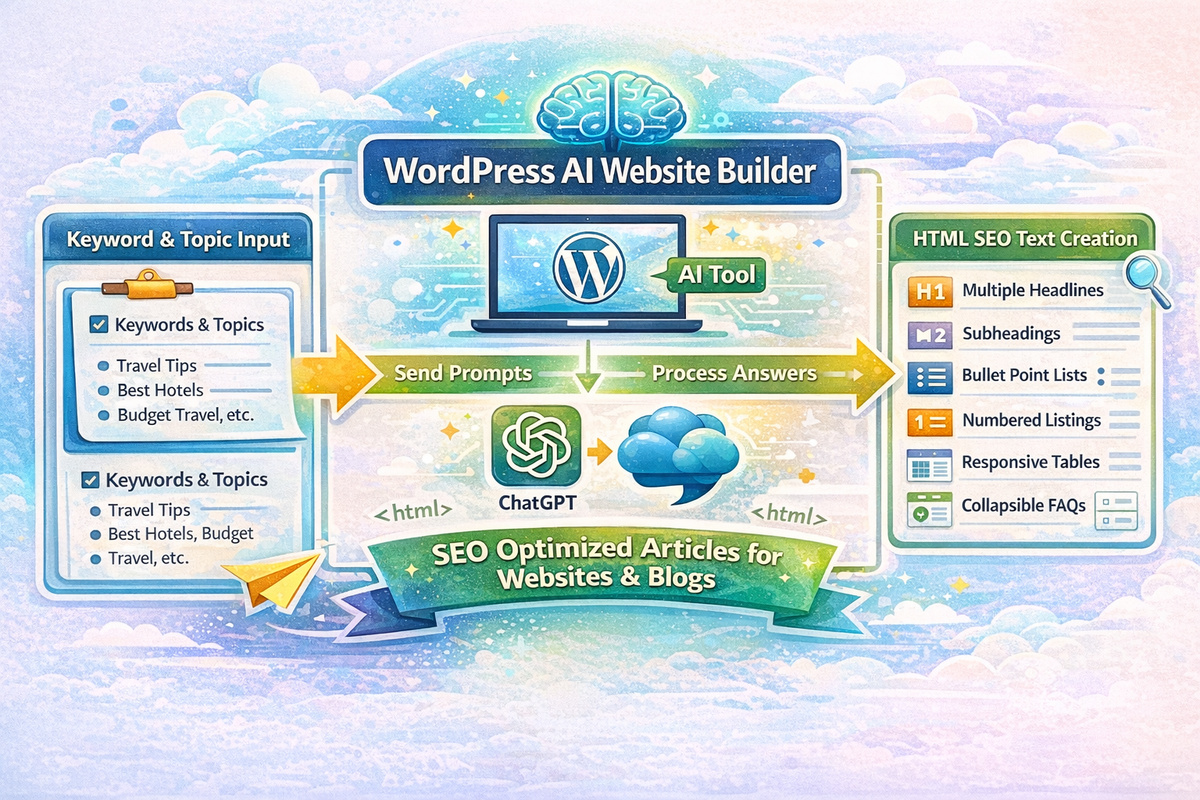
When content plans keep growing but writing time stays limited, a WordPress AI website builder gives site owners a practical way to move from topic idea to finished draft with less friction. Bloggers, affiliate marketers, and self-hosted WordPress users usually do not need more theory. They need a workable system that helps them turn keyword plans into website texts, blog articles, headings, subheadings, and matching visuals without getting stuck halfway through the process.

For many projects, this WordPress AI website builder solves a simple but costly problem: good ideas are easy to collect, yet hard to shape into consistent content. One day you need a homepage paragraph, the next day a blog post, then a comparison article, then a visual for the featured image. Instead of juggling separate writing, outlining, and image tasks, users can work from one content direction and produce material that is easier to review, adjust, and publish.

Create More Content Without Slowing Down

Small site owners and independent publishers rarely fail because they lack ideas. They fall behind because every article needs planning, structure, wording, revision, formatting, and media support. In that situation, a WordPress AI website builder helps reduce the time spent staring at an empty editor and increases the time spent shaping content that is ready for real use.

That matters for affiliate blogs, niche sites, and business websites where consistency influences traffic, trust, and conversions. A draft does not need to be final on the first pass. It needs to be useful, organized, and relevant enough to move your work forward. With a practical workflow, the WordPress AI website builder can help users create first drafts around search terms, product topics, and audience questions instead of starting from scratch each time.

Speed alone is not the goal. Better momentum is the goal. When a tool can suggest multiple headlines, create subheadings, write around keyword specifications, and support image generation, the work becomes easier to manage. Users can then spend more attention on editing, positioning, and accuracy rather than on repetitive setup tasks.

Why a WordPress AI Website Builder Fits Real Publishing Work

Start With Keywords Instead of a Blank Screen

Most content projects begin with a phrase, a topic cluster, or a list of search terms. That is why many site owners prefer software that starts from keyword input rather than from random prompt experiments. With a WordPress AI website builder, the workflow can begin where SEO planning usually begins: with the terms your audience may already be searching for.

From there, the software can turn topic direction into usable copy blocks, headline ideas, and supporting structure. This approach is helpful for bloggers who want to write with intent, for affiliate publishers who need commercial content around buyer questions, and for website owners who want their service copy to stay focused on the terms that matter most for discoverability.

WordPress AI Website Builder

Turn One Topic Into Headings, Drafts, and Images

A strong article or service page is rarely just one large paragraph. It needs a clear flow, useful headings, supporting examples, and visual material that fits the subject. In that setting, a WordPress AI website builder becomes more than a text prompt helper. It becomes a production shortcut that can turn one input direction into several parts of the finished asset.

Instead of writing a title, then pausing to invent subheadings, then switching tools to create visuals, users can build around one content goal. The result is a smoother workflow for websites that need regular updates and a simpler path for publishers who want to keep quality under control while producing more material over time.

Write Website Copy That Matches Search Intent

Search visibility is not just about repeating a phrase. Strong website copy usually works because it answers the reason behind the search. Some visitors want information, some want comparison, and some are close to choosing software. In those moments, a WordPress AI website builder is useful because it can help shape text around a topic, a purpose, and a likely user need rather than around disconnected keywords.

That is especially important for homepage sections, product introductions, category texts, and commercial blog posts. Searchers looking for software usually want clarity fast. They want to know what the tool does, who it suits, how it fits into their workflow, and why it may save time or simplify difficult tasks. When those answers appear early and in plain language, the copy becomes more useful for both readers and search engines.

Good structure also improves skimming. Readers do not consume most pages line by line. They scan headings, jump to sections, and look for fast proof that the content understands their problem. Because of that, a WordPress AI website builder has value when it helps users create multiple headlines and subheadlines that organize the message into clear sections instead of producing one long block of generic copy.

How a WordPress AI Website Builder Helps Bloggers and Affiliates

Build Article Drafts Around Real Topics

Bloggers and affiliate marketers usually work with content calendars, review ideas, product themes, seasonal topics, and search-driven article plans. A practical writing system needs to support that rhythm. In daily use, a WordPress AI website builder can help transform topic lists into article drafts that already follow a usable structure, which reduces the time between planning and publishing.

This is helpful when one niche needs many supporting articles. A publisher may need informational posts, product roundups, buyer guides, FAQ content, and supporting website texts that all relate to the same subject. Instead of rebuilding the format each time, the WordPress AI website builder can support a repeatable process where the user defines the angle, reviews the output, and adapts it to the site’s voice and purpose.

Keep Your WordPress Workflow Moving

Content production often slows down for practical reasons, not creative ones. The image is missing. The subheadings feel weak. The article intro is too vague. The service text sounds flat. A WordPress AI website builder helps reduce these interruptions by giving users more of the draft framework at the start.

That matters for self-hosted WordPress users because publishing is not only about writing. It also includes formatting, media choices, internal review, and ongoing updates. A smoother drafting process makes the whole system easier to maintain. For affiliate projects, that can mean faster rollout of supporting content. For bloggers, it can mean more regular publishing. For business sites, it can mean quicker updates to service and product-related texts.

From Keyword List to Finished Draft

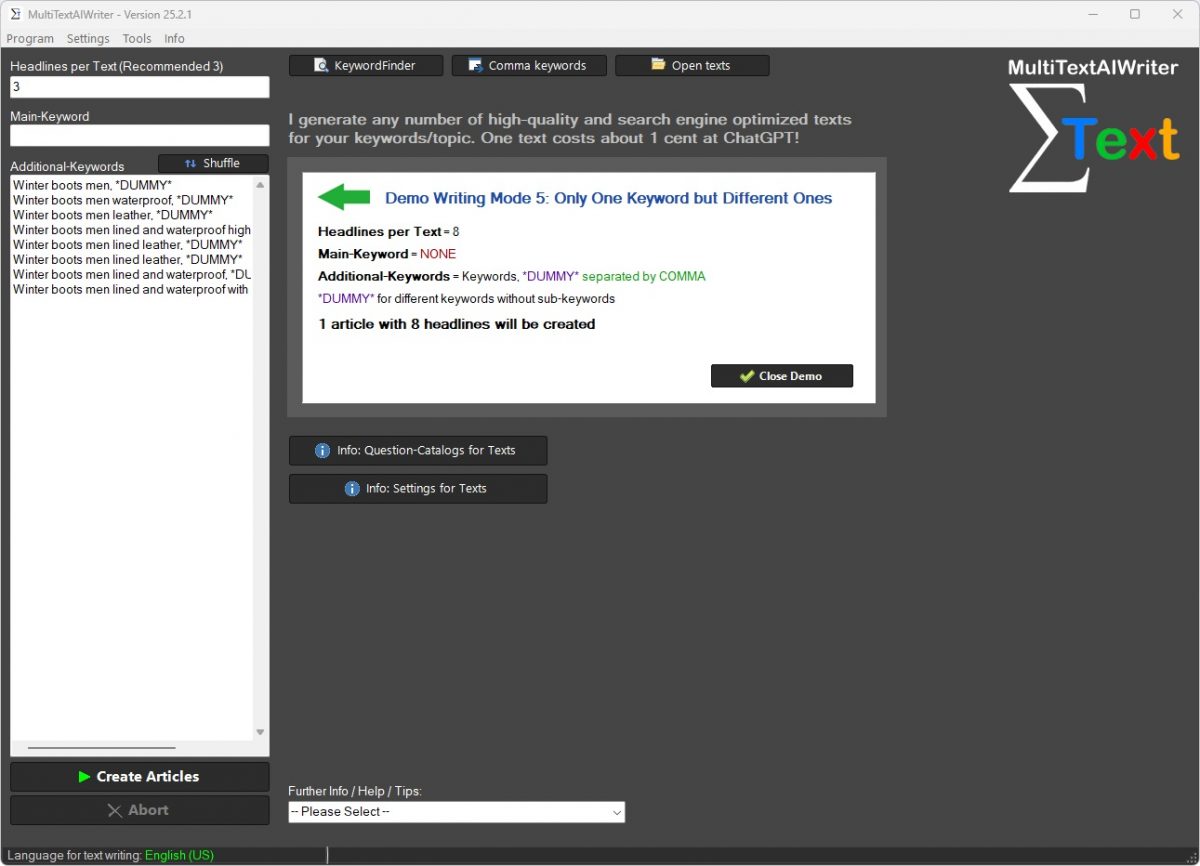
One of the strongest use cases starts with a list of primary and related keywords. A user knows the main topic, adds supporting terms, and uses that material to guide structure and wording. In that workflow, a WordPress AI website builder can produce a more focused draft than a vague one-line prompt because the content direction is clearer from the beginning.

The next step is organization. A good draft usually needs a main heading, logical H2 sections, targeted H3 subpoints, and short paragraphs that are easy to scan. With the right setup, the WordPress AI website builder can help create this structure early so the user is editing a framework instead of assembling one from zero.

After the text draft comes refinement. Some sections may need simpler language. Others may need more commercial intent, stronger user benefits, or better alignment with a niche topic. That review phase still matters. Software can help you move faster, but clear positioning, factual accuracy, and final judgment still depend on the person publishing the content.

Then comes supporting material. Articles and website texts perform better when they are visually supported. If the same workflow also includes AI-generated images, the user can prepare visuals that match the topic without leaving the content process behind. That makes planning more efficient and reduces the back-and-forth that slows many publishing teams and solo site owners.

What a WordPress AI Website Builder Can Create

Website Texts

Business websites need more than blog content. They need introductions, service descriptions, landing copy, benefit sections, and supporting text for category or product areas. In that context, a WordPress AI website builder can help users draft website texts that are easier to shape around target terms, user intent, and conversion goals.

This is useful for people updating older pages as well as for those launching new sites. Writing clear copy for a homepage or service page can be difficult because it needs to sound simple while still covering value, audience, and topic fit. Starting from a draft built around keywords and structured headings makes the editing stage easier and more focused.

Blog Articles and WordPress AI Website Builder FAQ Sections

Articles do more than fill a blog archive. They answer questions, support rankings, attract long-tail traffic, and build topical relevance around a niche. For that reason, a WordPress AI website builder can be especially useful when users need repeatable article production without repeating the same weak structure every time.

FAQ content is another strong application. Readers appreciate direct answers, and FAQ sections can help organize buyer questions or topic-specific concerns in a compact format. When article drafts include useful questions and answers, the content becomes easier to scan and more practical for visitors who want quick information before taking the next step.

AI Images and Supporting Assets

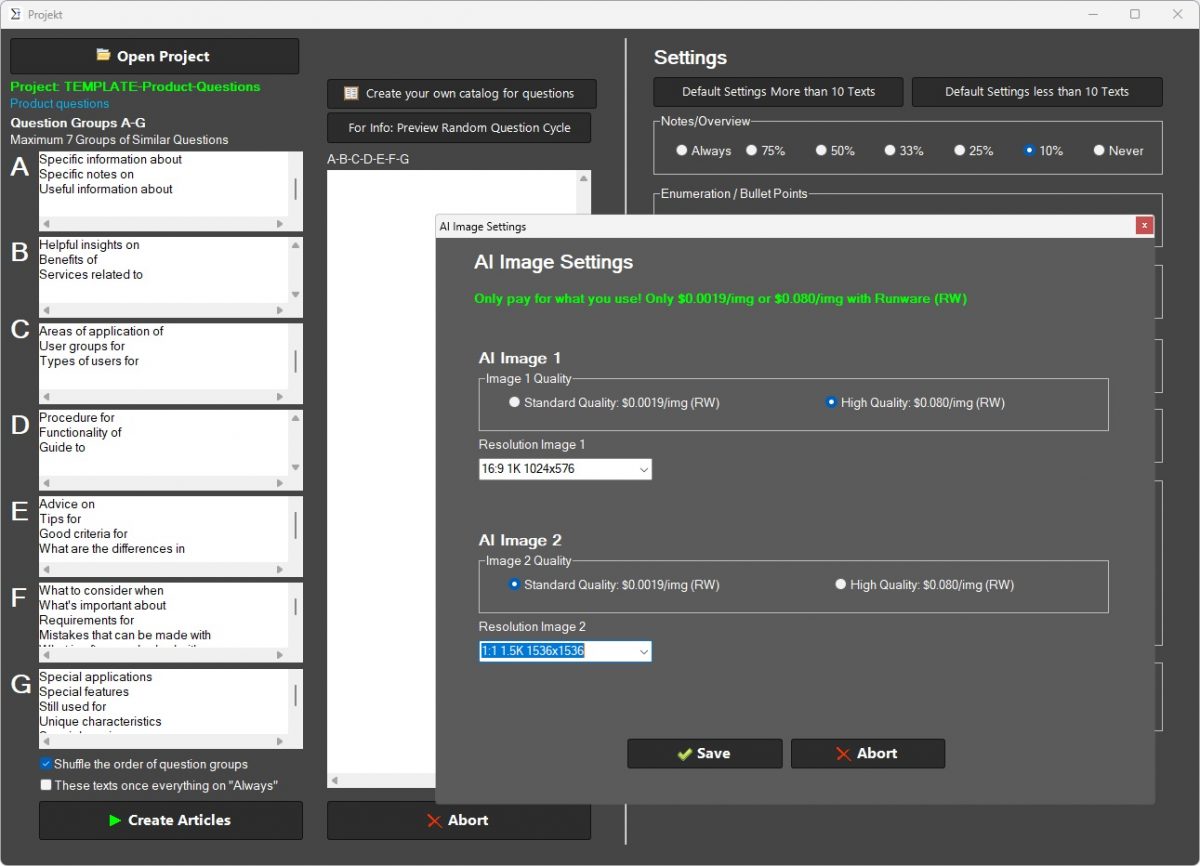
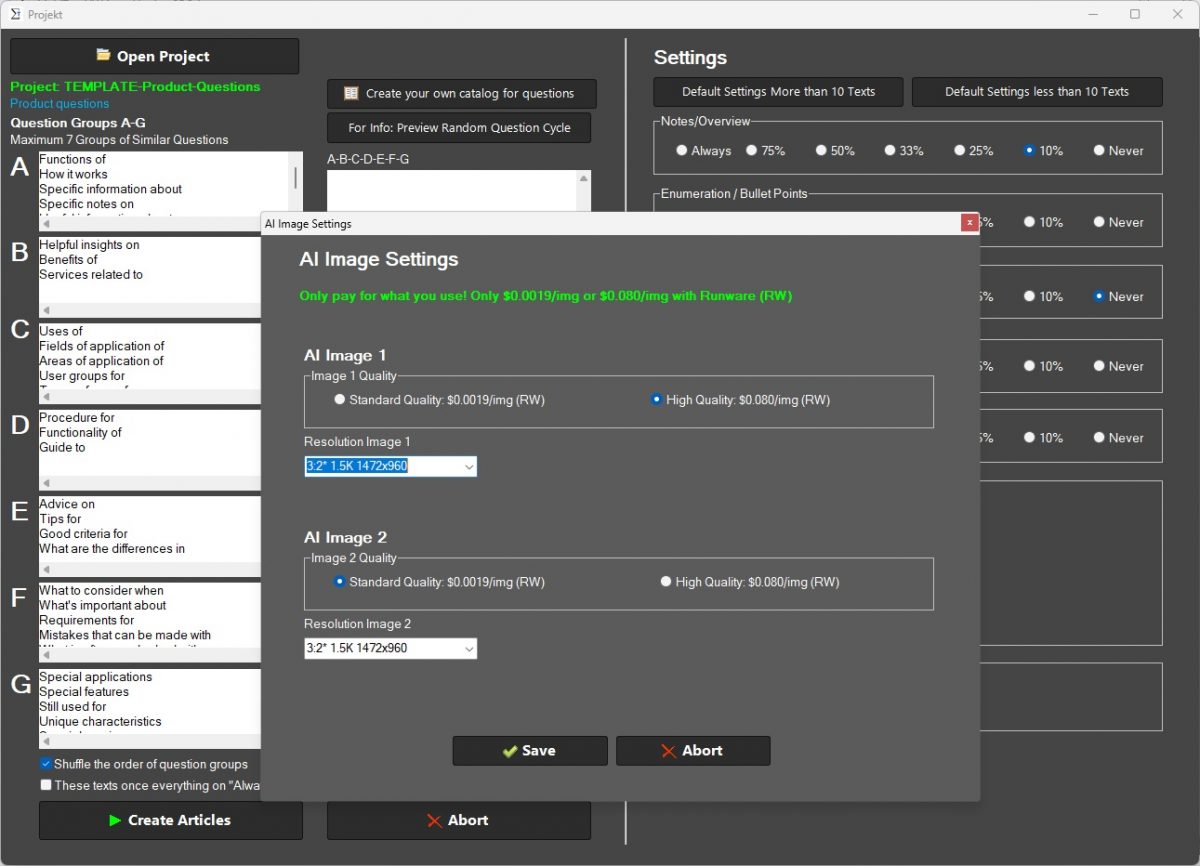
Words alone rarely carry a modern post or page. Visuals influence readability, perceived quality, and shareability. That is why many users want a system where text and imagery can be prepared in the same workflow. In daily use, a WordPress AI website builder with image generation support can help users produce topic-matching visuals for featured images, supporting graphics, and other content needs.

This approach is valuable for smaller publishers who do not want to source every image manually. It can also help maintain visual consistency across a site. When the image step is integrated into the same production flow as the writing step, fewer tasks get lost between draft and publication.

Reasons Users Choose a Simpler Content Workflow

Many software buyers are not looking for novelty. They are looking for fewer repeated tasks. They want to spend less time rebuilding article structures, less time forcing keywords into awkward copy, and less time moving between disconnected tools. Under those conditions, a WordPress AI website builder becomes appealing because it supports a practical content routine rather than just one isolated feature.

That routine may include choosing a target phrase, defining related terms, generating heading options, reviewing body copy, adding an FAQ block, preparing an image, and then publishing into WordPress after edits. None of these steps is mysterious. The value comes from how smoothly they connect.

Clear software value also depends on fit. Bloggers may care most about article throughput. Affiliate publishers may care most about topic coverage and commercial-intent drafts. Business site owners may care most about service-page copy and easier updates. A flexible WordPress AI website builder can support all three groups when it helps them build useful drafts around the content tasks they already have.

Choosing a WordPress AI Website Builder for Self-Hosted Sites

Self-hosted WordPress users usually want control. They want to manage their own publishing setup, shape their own content strategy, and decide how much automation fits their process. That is why a WordPress AI website builder is most compelling when it supports control rather than replacing it.

A good fit should help users start quickly, create around defined keywords, generate multiple headings and subheadings, support website and blog copy, and provide image options that reduce extra production work. At the same time, the final content should still be reviewed for accuracy, tone, intent, and brand fit before it goes live.

For affiliate marketing projects, that balance matters even more. Commercial articles need clarity and trust. General blog posts need relevance and structure. Service pages need strong benefit-led writing that explains what the offer does in plain English. A WordPress AI website builder can support all of that when the user treats it as a drafting and production tool, not as a substitute for judgment.

Used well, the software helps turn content planning into content output with less friction. That makes it easier to keep publishing, easier to cover more topics, and easier to build a site that stays active instead of waiting for the perfect moment to write the next piece.

Affiliate Article Structure Tool for Clearer Buying Content

Affiliate article structure tool works best when readers can find the answer without fighting the layout. Many posts lose momentum because the information is not arranged in a useful order. Product details may be buried, comparisons may arrive too late, and the recommendation may feel disconnected from the rest of the article. This product helps turn affiliate writing into a clearer reading path built around buyer questions and decision-stage content flow.

Instead of arranging every section by instinct, you can work from a stronger article framework that supports reviews, comparisons, roundups, and buying guides. That makes posts easier to scan, easier to trust, and easier to shape into content that supports real purchase decisions.

Make Affiliate Posts Easier To Read and Easier To Trust

Readers do not arrive on affiliate content to admire the structure. They arrive because they want help choosing. If the article feels cluttered or the important points are too hard to find, the value of the research gets lost. A clearer structure helps the article do its job faster.

This product is built for publishers who want a better way to organize intros, product sections, comparisons, use cases, pros and cons, and final recommendations. It supports a more useful article order so the content feels easier to follow from first click to final takeaway.

Lead With the Reader’s Main Decision

Every affiliate article should begin by clarifying what the reader is trying to decide. That decision may involve two products, several alternatives, a budget choice, or a use-case match. When the article leads with that question, the content feels more focused from the start.

A better structure keeps the decision visible early. That helps readers understand why the article matters and what kind of answer they can expect as they move through the sections.

Why How To Structure Affiliate Articles Matters for Buying Intent

How to structure affiliate articles matters because buying-intent readers scan differently from casual readers. They look for summaries, feature differences, use-case fit, and recommendation logic. If the structure hides those points, the article becomes harder to use even if the information itself is accurate.

This is why layout is not only a formatting choice. It is part of how the content supports decision-making. A stronger structure helps the reader move from uncertainty to clarity without sorting through disorganized sections.

How To Structure Affiliate Articles for Product Reviews

A product review needs more than praise and feature lists. It needs context, relevance, and a clear explanation of who the product suits. How to structure affiliate articles for product reviews means placing that context early enough that readers can decide whether the rest of the review is worth their time.

With a better framework, the review can introduce the product clearly, explain its ideal user, cover strengths and drawbacks, and lead into a recommendation that feels supported rather than rushed.

Guide Readers From First Click to Final Recommendation

A useful affiliate post should feel like guided decision support, not a pile of product notes. The opening needs to define the choice. The middle needs to explain the options. The end needs to help the reader act with more confidence. When that path is clear, the article becomes easier to use.

This product helps shape that reading flow so each section has a reason to exist. Instead of stacking information in whatever order it was collected, you can arrange it according to what the reader needs next.

Use Sections That Match Search Intent

Different affiliate searches create different expectations. A reader searching for a review needs a different article shape than someone searching for a comparison or a best-of list. Matching the layout to the search intent makes the article feel more precise.

That is why section order matters. When the content type matches the query type, readers are more likely to feel they landed in the right place.

How To Structure Affiliate Articles Without Guessing the Section Order

How to structure affiliate articles without guessing the section order is one of the biggest practical problems for publishers. It is easy to spend too much time moving sections around, rewriting transitions, or second-guessing whether the comparison should come before the reviews. A structure tool helps remove that uncertainty.

Instead of rebuilding the article architecture every time, you can work from a more stable framework that keeps research notes, product summaries, and recommendation logic in a more useful order.

How To Structure Affiliate Articles for Comparisons

Comparison articles work best when they surface meaningful differences quickly. How to structure affiliate articles for comparisons means putting feature differences, fit by user type, and trade-offs in places readers can find fast.

That helps the comparison feel more useful. Readers are not looking for two long product descriptions placed side by side. They want help understanding what changes their decision.

Build Stronger Reviews, Comparisons, and Roundups

Affiliate formats may differ, but they all depend on clear organization. Reviews need a convincing product story. Comparisons need distinct differences. Roundups need a reason for each pick. When those formats are structured well, readers can follow the logic without effort.

This product supports those formats by helping publishers shape articles around reading flow instead of raw notes. That creates a cleaner user experience and helps long-form commercial content feel less heavy.

Make Long Posts Easier To Scan

Many affiliate posts are necessarily detailed, but detail should not create confusion. Long articles become easier to use when the layout breaks decisions into manageable sections, summaries, and clearly labeled product blocks.

A stronger structure helps readers jump to the points they care about while still giving the full article enough depth to feel informed and trustworthy.

Where How To Structure Affiliate Articles Fits Modern Affiliate Publishing

How to structure affiliate articles fits modern affiliate publishing because current readers are more selective with their attention. They do not always read from top to bottom. They scan headings, compare summaries, and look for signals that the article understands their buying problem.

A layout built around that behavior helps affiliate content feel more practical. It turns the article into a tool for decision support instead of a loose collection of observations.

How To Structure Affiliate Articles for Roundups

Roundups become stronger when each recommendation has a clear role. How to structure affiliate articles for roundups means showing why one pick suits beginners, why another fits advanced users, and why another makes sense for budget-conscious buyers.

That kind of role-based structure prevents the list from feeling repetitive. Each product becomes easier to place in the reader’s mind, and the article becomes easier to remember.

Keep Product Details, Use Cases, and Buyer Questions in Balance

A strong affiliate article should not drown in features. Product details matter, but readers also need practical context. They want to know who the product suits, what problems it solves, where it falls short, and how it compares in real use cases. Balance matters because too much detail without guidance creates friction.

This product helps balance those elements by supporting layouts that combine product information with decision-oriented sections. That makes the article more useful for readers who need more than a simple list of specs.

Put Recommendations Where Readers Need Them

A recommendation loses strength when it appears too early or too late. Readers need enough explanation to trust it, but not so much delay that they stop reading before they reach it. Placement matters just as much as wording.

A better structure helps recommendations appear at the right point in the article, supported by comparison logic, product context, and reader-focused summaries.

What To Look for in How To Structure Affiliate Articles Software

How to structure affiliate articles software should do more than give you headings. It should support a useful content hierarchy, make long posts easier to scan, and help organize different commercial formats with less friction. The strongest products help convert research into readable flow.

Look for software that supports reviews, comparisons, roundups, and buying guides while keeping section order tied to reader needs. A good tool should make structure decisions easier without forcing every article into the same rigid layout.

How To Structure Affiliate Articles as a Repeatable Process

Affiliate publishing becomes easier to manage when structure is repeatable. How to structure affiliate articles as a repeatable process means you do not start with the same layout uncertainty every time you draft a new post.

That creates value beyond a single article. It supports a steadier workflow, more consistent article quality, and a clearer writing process across many affiliate topics.

Turn Research Notes Into a Better Reading Flow

Research is only useful when readers can move through it without effort. Product notes, feature lists, pricing details, and verdicts all have value, but they need order. A stronger reading flow helps the article feel like guidance instead of data dumped onto the screen.

This product helps shape that flow so the final content feels more deliberate. The article can move from problem to options to evidence to recommendation in a way that makes sense to the person making the decision.

Support a Clearer Path From Comparison to Choice

Many affiliate posts compare well but conclude poorly. They list differences, but do not help the reader act on those differences. A better structure closes that gap by connecting the comparison back to real buyer needs.

That gives the article a more complete role. It does not only present options. It helps the reader understand which option fits them best.

Who Benefits Most From How To Structure Affiliate Articles

How to structure affiliate articles is most useful for affiliate bloggers, niche publishers, review sites, and small content teams that want stronger commercial content without building every article layout from scratch. It is especially valuable for users creating detailed reviews, product comparisons, and buying guides on a regular basis.

It also helps anyone who already has solid product research but wants a better method for turning that research into readable, convincing, and well-ordered content that supports real buying decisions.

Create Affiliate Content That Feels Easier To Follow

Readers do not need more clutter. They need content that makes the decision clearer. A stronger structure helps remove confusion from long-form affiliate writing and gives each section a more useful job.

That is the core value of this product: helping publishers shape affiliate articles into content that feels easier to scan, easier to trust, and easier to use when a purchase decision is close.

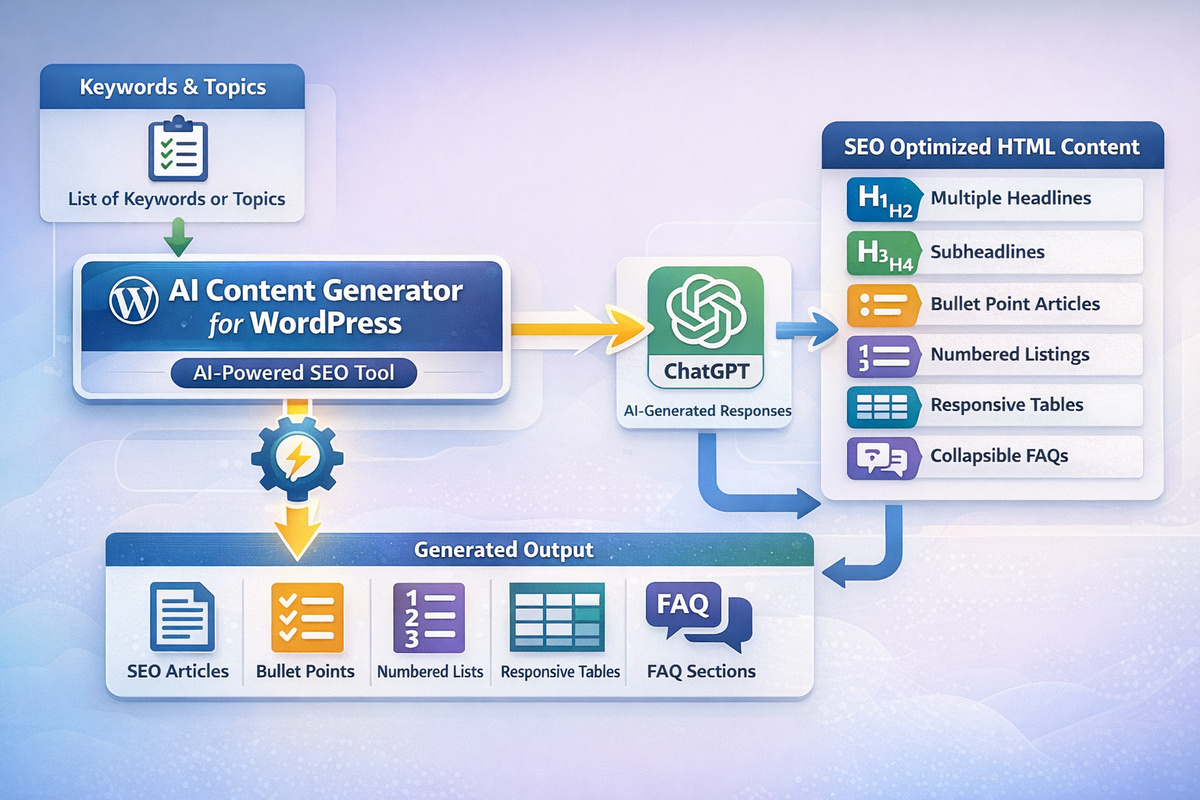
AI Content Generator for WordPress SEO-Focused

AI Content Generator for WordPress

When your content plan depends on steady publishing, an AI content generator for WordPress can help you turn keyword ideas into structured drafts without starting from a blank screen every time. For bloggers, affiliate site owners, and self-hosted WordPress users, the main value is not just speed. It is the ability to move from topic selection to readable article creation with a clearer workflow and fewer writing bottlenecks.

Instead of piecing together titles, subheadings, and list sections by hand, a practical AI content generator for WordPress gives you a more direct path from keyword input to article draft. That matters when you want content that stays focused on search intent, supports on-page SEO work, and still feels organized enough to edit before publishing.

Write Faster Without Losing Control

Content creation slows down when every post starts with the same problems: finding a topic, choosing the right keyword angle, shaping a headline, and building enough sections to make the article useful. With those hurdles in mind, an AI content generator for WordPress helps you start with a defined keyword direction and then build a draft that is easier to refine.

You still decide what the article should cover, which audience it should serve, and how the final version should sound. The software supports the early and middle stages of blog writing so that your time can go into editing, improving, and publishing instead of struggling to assemble every paragraph from scratch.

Turn Keyword Ideas Into Usable Drafts

A keyword list by itself does not become a good post. Most site owners need a workable structure before they can write something worth publishing. That is where a keyword-driven workflow helps. Once your topic and supporting terms are defined, the tool can shape the draft around headings, subheadings, and list elements that match the article goal.

For affiliate blogs and niche sites, that means less time spent wondering how to start and more time spent improving the article. When a draft already includes major talking points, supporting sections, and readable formatting, editing becomes easier and the path to publication becomes shorter.

Why an AI Content Generator for WordPress Fits Daily Publishing Work

During busy content cycles, an AI content generator for WordPress helps reduce the stop-and-start pattern that slows many blog workflows. You do not have to write every line from zero, and you do not have to manually sketch every headline before the first draft exists.

That support is useful for content calendars built around product topics, blog categories, affiliate comparisons, and informational articles. When your workflow depends on consistency, a structured draft gives you a better base for keeping your posting rhythm steady.

AI Content Generator for WordPress

Why Bloggers Choose an AI Content Generator for WordPress

Bloggers usually do not need vague promises. They need practical help with planning, writing, and organizing content. A useful tool in this category helps answer real questions: Which keyword angle should this article follow? How should the post be structured? Which subtopics deserve their own section? How can the draft stay readable while still covering the topic well?

Because a WordPress-focused workflow is different from generic AI writing, a specialized AI content generator for WordPress can be a better fit for self-hosted publishing projects. It aligns more closely with blog production, article formatting, and SEO writing needs than a general-purpose text tool aimed at every use case at once.

Build Posts Around Search Intent

Search intent matters because the same keyword can support very different article types. One user may want a product comparison, another may want a tutorial, and another may be ready to choose software. Writing without that intent in mind leads to thin articles, mixed messaging, and weaker relevance.

When the article starts from clearer keyword specifications, the structure becomes easier to shape. Headings can address what the reader actually wants, subheadings can guide the topic logically, and list sections can summarize key points in a way that is easier to scan.

Keep Article Structure Clear With an AI Content Generator for WordPress

Long blocks of text can weaken even a good idea. With an AI content generator for WordPress, structure becomes part of the drafting process instead of an afterthought. That includes multiple headline options, multiple subheadlines, and list-style content that gives readers a cleaner path through the article.

For blog owners, clear structure also supports editing. You can see whether the article flow works, whether a section is missing, and whether the content stays aligned with the main keyword before you publish it. That makes revision easier and helps you keep your article planning more consistent.

Solve Common Content Bottlenecks

Many WordPress users do not struggle because they lack ideas. They struggle because the writing process takes too many small decisions. Which title should come first? Which related terms belong in the article? How many sections are enough? Where should a list be used instead of another full paragraph?

Those repeated decisions take time, especially when you manage more than one blog category or publish content for affiliate campaigns. A focused writing workflow can remove part of that friction and help you keep moving from topic planning to edit-ready output.

Spend Less Time on Titles and Subheadings

Titles and subheadings shape both readability and search relevance. A weak title may reduce clicks. Weak subheadings may make the article harder to follow. By generating more than one headline and more than one subheading direction, the software gives you material to choose from instead of forcing you to invent every angle on demand.

That is useful when you need to match the tone of a niche blog, test article directions, or adjust wording to fit a specific keyword focus. Having options also makes it easier to edit for clarity rather than trying to create everything in one attempt.

Let an AI Content Generator for WordPress Support Topic Planning

Before writing starts, an AI content generator for WordPress can support the planning stage by helping you connect a main topic with related terms and article angles. That matters because better topic planning usually leads to stronger article coverage and fewer gaps in the final draft.

For affiliate marketers, this can help when building supporting articles around product terms, comparison ideas, and informational searches. For bloggers, it helps shape article clusters around a niche without losing the thread of what each post is meant to do.

How an AI Content Generator for WordPress Supports SEO Writing

SEO writing is not just about placing keywords into text. It depends on relevance, structure, readability, and alignment with what users are trying to find. A draft that covers the topic clearly, uses headings well, and stays focused on a specific query is easier to optimize than a draft that wanders.

That is why an AI content generator for WordPress can be useful for site owners who want a stronger starting point for SEO content. The benefit is not magic ranking power. The benefit is having a draft shaped around keyword intent and article structure from the start.

Use Keyword Inputs With More Direction

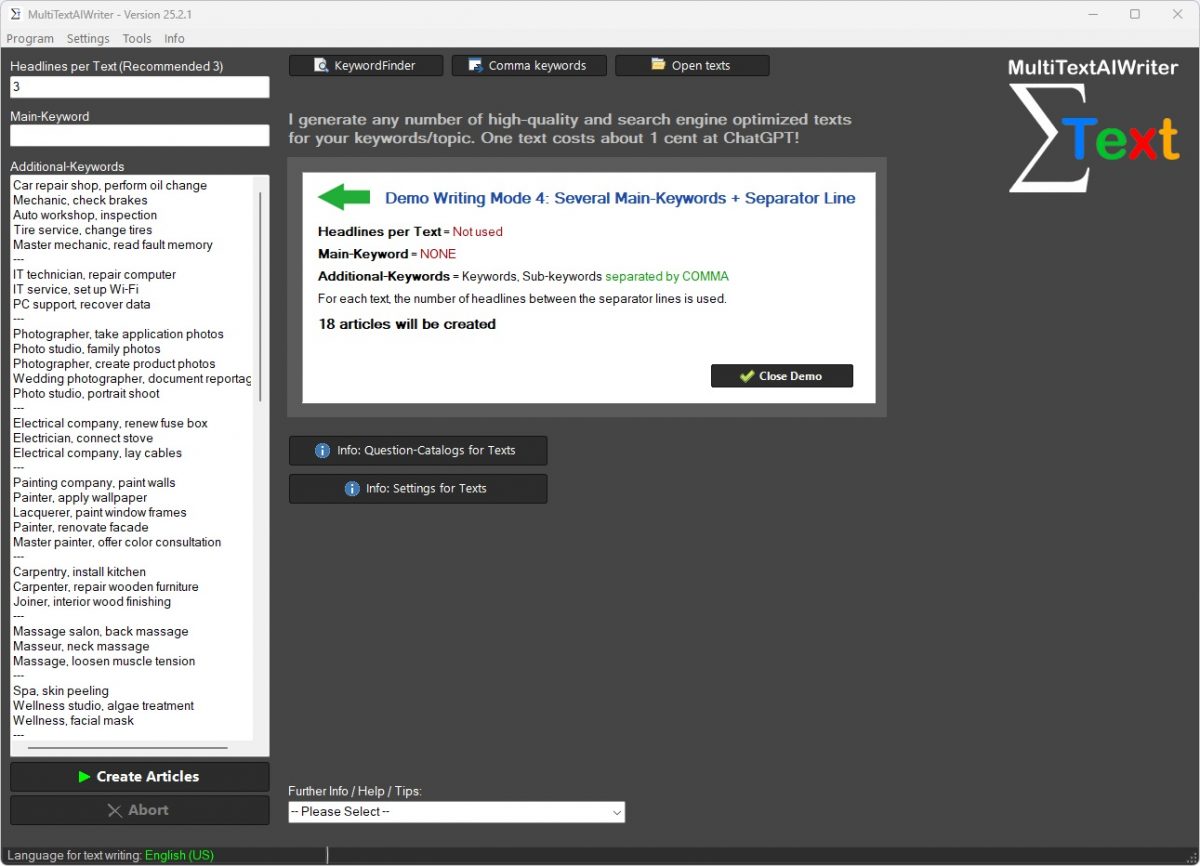
Writing from keyword specifications gives the article a clearer frame. Instead of beginning with a vague prompt, you can define the main keyword, add supporting terms, and move toward a draft that stays on topic. That helps the software produce text that is easier to review, easier to adjust, and easier to align with your publishing goal.

For self-hosted WordPress users, this can support category planning, article series creation, and routine content work across different topics. The more clearly you define the topic, the more useful the resulting draft becomes as a working base.

Shape Readable Articles With an AI Content Generator for WordPress

Readability matters for both search and user experience, and an AI content generator for WordPress can help shape content into sections that are easier to scan. Listings, shorter thematic blocks, and clear subheadings reduce clutter and help readers find the parts that matter to them.

That is especially useful when articles need to cover a topic in enough depth without becoming difficult to navigate. A structured article can hold more useful detail while still giving the reader a clear path from introduction to key points to conclusion.

Built for Self-Hosted WordPress Users

Self-hosted WordPress users usually need more control than casual publishing tools provide. They care about post structure, keyword direction, niche relevance, and how a draft will fit into an existing content plan. A WordPress-focused writing tool fits that reality better than software built only for generic text generation.

When you run your own site, each article has a job to do. It may support organic traffic, target a product-related search, build topical relevance, or answer a recurring audience question. In that setting, an AI content generator for WordPress is valuable because it supports content creation inside a publishing workflow that already has goals and constraints.

Useful for Affiliate Projects and Niche Blogs

Affiliate marketers and niche bloggers need focused content that stays close to the topic and supports article planning across many related searches. A tool that works from keyword specifications can help shape drafts for informational posts, buying-guides, product roundups, and supporting content tied to the main niche.

That does not remove the need for editing or subject knowledge. What it does is shorten the distance between idea and first draft, which is important when your workflow includes many posts with different keyword targets and article types.

Keep Your Workflow Simple With an AI Content Generator for WordPress

Once content production becomes repetitive, an AI content generator for WordPress can help simplify the process by giving you a consistent way to move from keyword research to draft creation. That kind of repeatable workflow matters when you want to publish steadily without turning every article into a long writing session.

For bloggers, that can mean less friction in weekly publishing. For affiliate sites, it can mean a more organized method for building content around categories and search terms. In both cases, the result is a cleaner system for producing draft content that still leaves room for your final editorial judgment.

FAQ About an AI Content Generator for WordPress

Why do site owners choose an AI content generator for WordPress?
An AI content generator for WordPress is chosen when site owners want to move faster from a topic idea to an article draft. That can save time during the planning and writing phase of content production.
Can an AI content generator for WordPress help with article consistency?
Yes. An AI content generator for WordPress can help maintain a clearer structure across multiple posts by generating organized sections, draft headlines, and a more predictable article flow.
Is an AI content generator for WordPress relevant for niche websites?
Yes. Niche websites usually depend on focused content around tightly defined subjects, and an AI content generator for WordPress can help prepare drafts that stay centered on those subject areas.
What is the main practical advantage of an AI content generator for WordPress?
The main practical advantage of an AI content generator for WordPress is that it reduces the effort needed to create an initial version. Instead of beginning with an empty page, you start with material that can be refined and adapted.

Start Writing With an AI Content Generator for WordPress

If your current process is slowed by topic planning, title writing, and article structuring, an AI content generator for WordPress can give you a more direct way to build drafts from keyword ideas. That matters when you want clearer workflows, steadier publishing, and more control over how blog content is shaped before it goes live.

For self-hosted WordPress users, affiliate marketers, and bloggers, the practical value lies in turning keyword research into usable writing output with less friction. When the draft already includes organized sections, headline options, subheadings, and listing elements, your work can shift toward editing and publishing instead of struggling with first-draft creation.

Blog Content Planning Tips for a Smarter Publishing Workflow

Running a blog becomes much easier when planning is clear for good blog content. Many publishers do not run out of ideas. They run into confusion about which topic should be published next, how posts should be spaced, and how each article fits into the wider direction of the site. This product helps turn loose ideas, keyword targets, and reader questions into a more usable publishing plan.

Instead of deciding from scratch every time you sit down to write, you can work from an organized article queue. That helps reduce planning friction, supports a steadier content schedule, and gives each post a clearer role inside your blog strategy.

Plan Blog Posts With Less Guesswork

When the next article is unclear, writing slows down before it even begins. You may have several promising ideas but no easy way to rank them, shape them, or decide which one deserves attention first. That uncertainty wastes time and makes publishing feel harder than it should.

This product is built to reduce that uncertainty. It helps bloggers sort ideas by topic fit, priority, keyword direction, and publishing order so the next post is easier to choose and easier to prepare.

Start With Priority, Not With Pressure

Many blogs are planned under pressure. A publisher realizes a new post is needed, opens a list of old notes, and picks something quickly just to keep the blog moving. That leads to uneven quality and weak topic order.

A better planning system starts with priority. When you know which article matters most, the writing process becomes more focused and the publishing queue becomes easier to trust.

Why Blog Content Planning Tips Matter Before You Start Writing

Blog content planning tips matter most before the draft begins. Planning shapes what the article is meant to do, which audience it serves, and which search intent it should satisfy. Without that clarity, even well-written posts can feel unfocused or too similar to other pieces on the site.

This is why planning should not be treated as an afterthought. A stronger process helps define the article angle early, which makes the final content easier to structure and easier for readers to understand.

Blog Content Planning Tips and Topic Clarity

A clear topic is more than a title. It includes the main angle, the target reader, the type of problem being solved, and the reason the article belongs on the blog. Blog content planning tips and topic clarity go together because a weak topic definition usually leads to weak content.

When the planning process forces that clarity early, the article has a better chance of staying focused from opening line to final section.

Turn Topic Ideas Into a Clear Publishing Queue

Ideas alone do not build a blog. They need order. A useful planning workflow helps turn loose concepts into a visible article queue so you can see what is coming, what is already being prepared, and what should wait until later.

That kind of visibility matters because it removes decision fatigue. Instead of facing the same “What should I write next?” question every week, you can move forward through a planned sequence of topics that supports the growth of the blog.

Organize Ideas Before They Turn Into Drafts

Once a draft starts, changing direction becomes harder. It is easier to fix weak planning before the article is written than to rewrite a post after realizing the angle was wrong from the start.

Organizing ideas early helps protect your writing time. You can filter out weak topics, merge overlapping ones, and strengthen promising ideas before they become work-heavy drafts.

How Blog Content Planning Tips Help Prevent Topic Overlap

Topic overlap is one of the quiet problems that can weaken a blog over time. Blog content planning tips help prevent topic overlap by making article purpose visible before writing begins. When two ideas answer nearly the same question, a planning step makes that easier to spot.

That matters because overlapping posts create extra work without creating stronger content depth. A better planning system helps each article claim its own role so the blog grows with more structure and less repetition.

Blog Content Planning Tips for Smaller Blogs

Smaller blogs feel topic overlap faster than large sites do. A few similar articles can make the whole content library look repetitive. Blog content planning tips for smaller blogs are especially useful because every article carries more weight.

When each post has a defined purpose and a distinct angle, the blog feels more deliberate and easier to expand in a useful direction.

Build a Better Routine for Weekly and Monthly Planning

Strong publishing rarely comes from one-time planning. It works better when article selection becomes part of a weekly and monthly routine. That allows you to review priorities, adjust timing, and keep the content pipeline moving without rebuilding the process every few days.

This product supports that kind of routine by helping you track what is ready, what still needs shaping, and what belongs later in the publishing cycle. A clearer schedule makes content work easier to continue.

Build a More Useful Article Queue

An article queue should do more than hold titles. It should show why the article matters, which keyword or topic it supports, and how soon it should be written. A stronger queue gives the blog more direction and gives the writer a better starting point.

That makes it easier to move from planning into drafting without hesitation. The next post is not a guess. It is a planned decision.

Where Blog Content Planning Tips Fit Into a Real Editorial Process

Blog content planning tips fit into a real editorial process at the earliest stage, but their value carries all the way through drafting and publishing. When the planning is strong, the rest of the work becomes easier to manage. Outlines are clearer, drafts stay closer to the point, and publishing order makes more sense.

That is why planning should be treated as an operational step, not only a creative one. A blog runs better when its future content is visible and organized instead of hidden in scattered notes.

Blog Content Planning Tips and Publishing Consistency

Inconsistent publishing is often a planning problem before it is a writing problem. Blog content planning tips and publishing consistency are closely linked because a weak queue leads to missed deadlines, rushed article choices, and uneven output.

A steadier planning workflow helps solve that by keeping the next steps visible. When the next article is already defined, it becomes easier to keep posting at a manageable pace.

Match Posts to Search Intent and Reader Needs

A blog should not publish every post in the same format. Some readers want a quick answer. Some want detailed instruction. Some want product comparisons or buying guidance. Planning becomes stronger when each post is matched to the kind of need it is meant to serve.

This product helps bring that logic into the planning stage. Instead of treating all ideas as equal, you can sort them by purpose and prepare content that feels more useful to the right kind of reader.

Keep Keywords, Angles, and Timing Connected

Keyword planning works best when it is tied to article timing and topic angle. A strong keyword alone does not guarantee a strong post. It still needs the right format, the right audience fit, and the right place in the publishing queue.

When those pieces stay connected, the blog becomes easier to manage and the final articles tend to feel more focused from the start.

What To Look for in Blog Content Planning Tips Software

Blog content planning tips software should do more than store ideas. It should help you sort them, group them, prioritize them, and connect them to a realistic publishing process. The strongest products support clear thinking before the writing begins.

Look for a tool that helps organize article queues, keeps topic direction visible, supports keyword mapping, and reduces duplication. A basic list of titles is not enough when the goal is a better publishing system.

Blog Content Planning Tips as a Repeatable System

Advice becomes more useful when it turns into a routine. Blog content planning tips as a repeatable system means you do not start from zero every week. You follow a process that helps capture ideas, filter them, assign purpose, and place them into a workable schedule.

That kind of repeatable structure creates long-term value because it supports ongoing publishing instead of only solving one planning session.

Create a Stronger Content Rhythm Without Random Publishing

Random publishing usually creates uneven results. One month may be active, the next may be quiet, and article quality may shift because each post is chosen differently. A stronger planning process supports a more reliable content rhythm without forcing an unrealistic schedule.

This product helps you build that rhythm by giving your blog a clearer order of work. Future posts stay visible, planning decisions become easier, and content production feels more manageable over time.

Support a More Realistic Publishing Cadence

Ambitious plans are easy to make and hard to maintain. A useful planning system should help you build a cadence that fits your real time, not an ideal version of your schedule.

That makes the blog easier to sustain. A steady pace with clear priorities usually works better than a crowded plan that collapses after a few weeks.

Who Benefits Most From Blog Content Planning Tips

Blog content planning tips are most useful for solo bloggers, niche publishers, affiliate site owners, company blogs, and small content teams that want a clearer way to prepare future posts. The product fits anyone who needs more order between idea collection and publication.

It is especially valuable for users who already have enough content ideas but lack a strong method for turning those ideas into a consistent publishing routine that supports topic depth and long-term growth.

Create a Smarter Path From Idea to Published Post

Most blogs do not need more random inspiration. They need a better way to turn existing ideas into finished articles in the right order. That is where a planning workflow becomes useful.

This product helps make that path clearer by organizing priorities, keeping topics distinct, and giving the publishing process more structure from the start.

WordPress AI Text Generator for Blog Posts

WordPress AI Text Generator

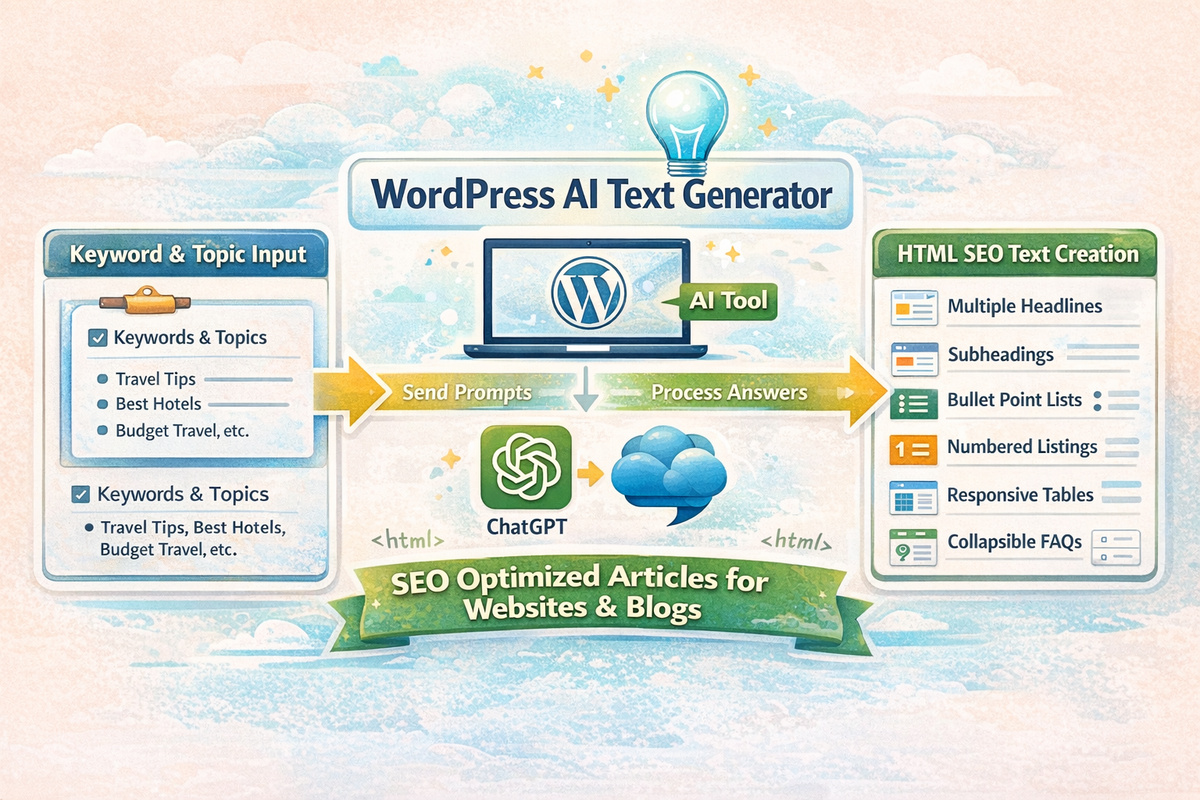
Running a self-hosted WordPress site takes more than publishing ideas. You need clear articles, useful page copy, search-ready snippets, and visuals that match the topic. With a WordPress AI text generator, you can move from keyword planning to finished drafts much faster and keep your publishing schedule under control.

For bloggers, affiliate marketers, and site owners, a WordPress AI text generator helps reduce the time spent on first drafts while keeping content structured and readable. Instead of switching between separate tools for articles, FAQ sections, snippets, and images, you can work with one workflow that supports content production from the first topic idea to the final draft.

When your site depends on steady output, a WordPress AI text generator gives you a practical way to create blog articles, website texts, Word-ready copy, FAQ blocks, and meta descriptions without starting from a blank page every time. That means less friction in your daily writing process and more room to focus on topics, offers, and publishing decisions.

Create More Content Without Slowing Down Your Publishing Schedule

Content work usually breaks down at the same point: the draft never starts fast enough. Topic planning may be clear, yet the first paragraphs, the section order, and the supporting questions still take time. With a WordPress AI text generator, that early bottleneck becomes much smaller because the system can shape raw ideas into usable text blocks quickly.

Writers who manage several categories, product themes, or niche topics need repeatable output. A WordPress AI text generator supports that need by helping you produce article drafts with a clearer structure. You can build new posts, revise older article ideas, and prepare text for different publishing goals without rebuilding the process from zero for every piece.

That matters even more when your site grows. A product page needs a different tone than a blog article, and a short snippet for search results needs a different length than an FAQ answer. With a WordPress AI text generator, those content types can be prepared in one content workflow, so your process stays more organized across the whole site.

WordPress AI Text Generator

Why a WordPress AI Text Generator Fits Real Content Work

Most site owners do not struggle because they have no ideas. They struggle because turning ideas into finished copy takes too much time. A WordPress AI text generator helps shorten that gap by converting topics into structured draft material that is easier to edit, review, and publish.

For self-hosted WordPress users, flexibility is important. You may need long blog posts for organic traffic, shorter website copy for service pages, FAQ sections to answer buyer questions, and quick meta descriptions for search results. With a WordPress AI text generator, those jobs can be handled inside one writing system rather than spread across disconnected tools.

Another common problem is uneven structure. One article may be detailed, while the next feels thin or repetitive. A WordPress AI text generator helps keep sections more consistent by giving you a repeatable foundation for headings, supporting paragraphs, and reader-focused question blocks.

Use a WordPress AI Text Generator for Blog Articles and Site Copy

Write Blog Posts With a WordPress AI Text Generator

Regular blog publishing is one of the hardest parts of running a content-driven site. Topic lists grow quickly, but the drafting workload grows even faster. With a WordPress AI text generator, you can turn topic ideas into article drafts that already include a clear flow, useful subpoints, and a stronger starting structure for editing.

That makes a difference for niche blogs, review sites, and affiliate projects. Instead of waiting until you have enough time to write every article manually, a WordPress AI text generator helps you build first versions faster. You still decide what to keep, revise, or remove, but the hardest part of the process no longer depends on a blank document.

Create Website Texts With a WordPress AI Text Generator

Not every page on a site is a blog post. Homepages, about pages, service pages, category pages, and product-related content need concise wording and a clear focus. With a WordPress AI text generator, you can draft website copy that is easier to shape into clean, direct page text for visitors and search engines.

That is useful when the same site needs both informative articles and conversion-focused page copy. A WordPress AI text generator gives you a faster route to both, so your content style can stay more consistent even when the page formats are different.

Prepare Word Documents From a WordPress AI Text Generator

Some content projects continue outside WordPress. Teams may review drafts in Word, freelancers may need editable files, or content may be reused for proposals, outlines, and offline revisions. With a WordPress AI text generator, it is easier to create text that can also move into Word-based workflows without forcing a separate drafting step.

That added flexibility matters when content production is not limited to direct publishing. A WordPress AI text generator can support the writing stage first, while your editing and approval steps continue in the tools you already use.

Turn Search Questions Into WordPress AI Text Generator FAQs

Answer Buyer Questions With a WordPress AI Text Generator

Many pages lose value because they stop after the main pitch and leave common questions unanswered. A WordPress AI text generator helps you build FAQ sections that address practical concerns, buying doubts, and usage questions in a compact format that readers can scan quickly.

That matters for both blog articles and commercial pages. When visitors can find direct answers without leaving the page, they are more likely to stay engaged with the topic. A WordPress AI text generator supports that by turning common topic questions into concise answers that fit naturally below the core content.

Make Articles Easier to Scan With a WordPress AI Text Generator

Long articles can feel dense when they only use standard paragraphs. FAQ blocks break up the reading flow and make the content easier to navigate. With a WordPress AI text generator, you can add collapsible question sections that keep articles more organized while giving readers fast access to key information.

This is especially useful for affiliate content, product guides, tutorial-style articles, and comparison content. A WordPress AI text generator can support those formats by combining informative body text with question-based sections that handle objections and practical details.

Build Search Snippets With a WordPress AI Text Generator

Create Meta Descriptions With a WordPress AI Text Generator

Publishing a page without a strong meta description means missing an easy part of the SEO workflow. A WordPress AI text generator can help draft short descriptions that reflect the page topic more clearly and reduce the need to write each snippet by hand.

This is helpful when you manage many articles or update older posts. A WordPress AI text generator gives you a faster way to prepare supporting SEO copy so your pages are not left with unfinished snippet fields during publication.

Keep Short-Form SEO Copy Aligned With the Main Topic

Short copy needs discipline. It must match the main topic, stay readable, and avoid generic filler. With a WordPress AI text generator, the short-form text can stay more closely tied to the article or page theme, which makes the overall content package feel more coherent.

For site owners handling many posts at once, a WordPress AI text generator reduces the chance that the long article gets attention while the supporting search snippet is forgotten. That creates a more complete publishing routine from start to finish.

Use a WordPress AI Text Generator With Visual Content Support

Create Matching Images Alongside a WordPress AI Text Generator

Text alone is not always enough. Blog articles, category pages, and social-ready content usually perform better when the visual side is prepared at the same time. With a WordPress AI text generator, you can support article production with AI-generated images that fit the topic direction more closely.

That saves time compared with hunting for every visual asset one by one. A WordPress AI text generator paired with image creation helps keep the content package moving, especially when several posts need ready-to-use visuals for publishing queues or editorial calendars.

Keep Your Workflow More Consistent Across Text and Images

When articles and visuals are created in separate, disconnected steps, delays become more common. A WordPress AI text generator helps reduce that problem by keeping text creation and image support closer together in the same workflow. The result is a smoother process for content teams of one, independent bloggers, and affiliate publishers managing multiple topics.

This matters most when output volume starts increasing. A WordPress AI text generator can help you keep text, FAQ sections, snippets, and visuals aligned so content production feels less fragmented across tools and tasks.

Who Gets the Most From a WordPress AI Text Generator

Self-Hosted WordPress Users

For site owners running self-hosted WordPress installations, speed and control matter at the same time. A WordPress AI text generator fits this audience because it supports direct content creation while still giving you room to edit, shape, and publish on your own terms.

Affiliate Marketers

Affiliate projects usually depend on ongoing topic coverage, product-focused information, and searchable content that keeps growing over time. With a WordPress AI text generator, affiliate marketers can build article drafts, FAQ sections, and supporting page copy faster across multiple content themes.

Bloggers and Niche Publishers

Independent bloggers need consistent output without turning every post into a full-day writing session. A WordPress AI text generator helps bloggers move from topic ideas to draft articles with less delay, which is useful for review blogs, niche sites, hobby projects, educational content, and specialized editorial work.

Choose a WordPress AI Text Generator With Output You Can Actually Use

Not every content tool is worth using just because it creates text quickly. The real test is whether the output is structured well enough to edit, clear enough to publish, and flexible enough to fit different page types. A WordPress AI text generator should help you create articles, FAQs, website texts, snippets, and visual support without forcing awkward rewrites at every step.

Look for practical output first. A WordPress AI text generator should give you readable draft material for self-hosted WordPress projects, not just generic blocks of text. It should support blog content, website copy, question sections, and short SEO fields in a way that fits real publishing work.

It also helps when the workflow supports topic variety. A WordPress AI text generator should be useful for both evergreen article writing and shorter page-level tasks. That flexibility is what makes the software category valuable for bloggers, affiliate publishers, and content-driven website owners who need more than one format from the same system.

AI Content Workflow for Niche Sites

Growing a focused website takes more than article ideas. It takes a clear way to move from topic planning to finished draft without losing direction. This product is built for publishers who want a steadier process for creating specialized content and keeping small websites organized as they grow.

Instead of handling every post as a separate writing task, you can work through a connected sequence that supports topic research, article planning, draft creation, and publishing preparation. That helps reduce confusion, keeps content tied to the niche, and makes ongoing production easier to manage.

Build a Clear Publishing Routine for Specialized Websites

Niche sites usually perform best when content is planned with care and published with consistency. Random articles may fill space, but they rarely create a strong editorial direction. A better routine helps you decide what to write, why it matters, and how each article should move toward publication.

This product supports that routine by turning content work into a repeatable system. You can organize topic ideas, shape article intent, and move drafts forward with less guesswork. That makes the whole writing process feel less scattered and more practical.

Start With a Topic Queue, Not a Blank Document

Many content slowdowns begin before the writing even starts. You may know the general subject area, but not which article should come next. Without a clear queue, writing sessions can begin with uncertainty and end with partial progress.

A topic-first workflow helps solve that problem. Instead of opening a blank document and hoping the right angle appears, you begin with a defined content target that fits the niche and supports the site’s broader direction.

Why AI Content Workflow for Niche Sites Matters When Topics Are Narrow

Narrow topics require more discipline than broad websites do. AI content workflow for niche sites matters because it helps keep each article aligned with the site’s purpose rather than drifting into unrelated subjects. On specialized websites, that alignment is a major part of building a useful content library.

When the workflow is clear, it becomes easier to see which questions have been covered, which angles still need work, and where new content should go next. That makes publishing feel more deliberate and less reactive.

AI Content Workflow for Niche Sites and Topical Focus

A narrow site does not benefit from random expansion. Articles need to fit together in a way that shows subject depth and editorial control. AI content workflow for niche sites supports that by keeping content planning tied to the actual niche instead of letting ideas spread too widely.

This helps publishers stay on topic while still finding enough fresh angles to keep the site moving. It is not only about generating more text. It is about generating the right kind of content for the website you are building.

Move From Topic Idea to Draft Without Losing Direction

A good article idea is only the start. The real challenge is keeping that idea intact through outlining, drafting, and preparation. Many publishers lose the original direction halfway through the process, which leads to vague articles, repeated points, or drafts that no longer match the target topic.

This product helps preserve direction by giving the article a defined path. Topic, intent, structure, and writing flow stay more closely connected, which makes it easier to produce drafts that still reflect the original goal.

Turn Article Goals Into a Writing Sequence

Each article should do a specific job. It may answer a question, clarify a process, compare options, or support a buying decision. When that goal is visible early, the draft usually becomes easier to shape.

A structured sequence helps turn that goal into action. Instead of moving through the article in a random way, you can build from topic to outline to draft with a clearer sense of what the final piece needs to accomplish.

How AI Content Workflow for Niche Sites Reduces Content Chaos

Content chaos usually comes from disconnected work. AI content workflow for niche sites reduces content chaos by keeping research notes, keyword direction, article purpose, and draft progress closer together. That makes it easier to see what belongs in the pipeline and what still needs attention.

Without that structure, promising ideas can disappear into scattered notes, similar drafts can overlap, and writing sessions can produce work that does not fit the publishing plan. A steadier workflow reduces that disorder and gives the site a cleaner operating rhythm.

AI Content Workflow for Niche Sites for Small Publishers

Small publishers face a special kind of pressure because the same person may handle planning, writing, editing, formatting, and publishing. AI content workflow for niche sites gives those publishers a more workable process so the job feels less fragmented.

That can make a real difference over time. When the process is easier to follow, it becomes easier to keep publishing without constantly rebuilding your method from scratch.

Create a Repeatable Process for Article Planning and Writing

Consistency does not happen by accident. A repeatable process helps keep article quality more stable, even when you are publishing across many related topics. It also reduces the amount of setup work required each time a new draft begins.

This product is designed to support that kind of repeatable writing process. It helps organize how topics become outlines, how outlines become drafts, and how drafts move closer to publication without turning every article into a one-off project.

Keep Drafts, Notes, and Keywords Connected

Writers lose time when topic notes sit in one place, keyword ideas in another, and the actual draft somewhere else entirely. That separation makes it harder to keep the article focused and harder to know where the piece stands in the process.

A connected workflow helps prevent that split. When notes, targets, and draft direction stay aligned, content production becomes easier to manage and easier to continue.

Where AI Content Workflow for Niche Sites Fits Daily Publishing Work

Daily publishing work is rarely just writing. AI content workflow for niche sites fits daily publishing work by supporting the steps around the draft as well: choosing the next topic, keeping article intent visible, organizing outlines, and preparing pieces for the publishing queue.

That broader support matters because most friction in content work happens between stages. Planning stalls, drafts drift, or finished pieces wait too long for the next step. A workflow product helps close those gaps.

AI Content Workflow for Niche Sites and Content Consistency

Readers do not need every article to sound the same, but they do benefit when a site feels organized. AI content workflow for niche sites and content consistency go together because a stable process helps create cleaner article structure and more reliable topical focus.

That kind of consistency can make the site easier to manage internally and easier for readers to understand externally. The result is a stronger sense of editorial order across the content library.

Keep Topic Coverage Tight and Consistent

Focused sites perform better when they cover their subject deeply instead of reaching in too many directions. That requires clear decisions about what belongs on the site and what does not. A better workflow makes those decisions easier because each article is planned in context, not in isolation.

This helps publishers build depth around related subtopics, question patterns, and long-tail opportunities without losing sight of the site’s main focus. A narrower editorial path can be a strength when the process supports it well.

Build a Better Process for Long-Tail Content

Long-tail content can bring in highly specific readers, but only when the article stays close to the actual query. Broad or unfocused drafts tend to miss that mark. A stronger workflow helps shape these pieces with more precision from the start.

That is especially useful for niche websites where detailed questions and smaller topic angles make up a large part of the publishing strategy.

What To Look for in AI Content Workflow for Niche Sites Software

AI content workflow for niche sites software should do more than generate paragraphs. It should help you manage the path from topic idea to article-ready draft in a way that fits specialized publishing. The strongest products are built around clarity, repeat use, and topical discipline.

Look for software that supports planning, keeps article purpose visible, and helps connect keyword direction to actual draft structure. A tool that only speeds up one writing step may still leave the larger process disorganized.

AI Content Workflow for Niche Sites as a Working System

A useful product should feel like a working system rather than a disconnected feature set. AI content workflow for niche sites as a working system means each stage supports the next one, so the process feels smoother from one article to another.

That creates value over time because the benefit is not limited to a single draft. It supports the routine behind ongoing publishing, which is where many small sites struggle most.

Support Ongoing Publishing Without Starting Over Each Time

Publishing slows down when every article begins with a fresh round of decisions about workflow, structure, and direction. A product like this helps reduce that reset by giving you a repeatable framework that can be used again and again across new content.

That matters for niche publishers who need steady output without turning article creation into a daily planning problem. A familiar process can make the work easier to continue over weeks and months.

Support a Steadier Editorial Rhythm

Momentum matters in content publishing. When the workflow is too loose, output becomes uneven and projects lose energy. A clearer sequence helps preserve progress because each article has a known next step instead of waiting in uncertainty.

That steadier rhythm can help solo publishers and small teams keep work moving even when the site covers many small but related topics.

Who Gets the Most Value From AI Content Workflow for Niche Sites

AI content workflow for niche sites is most useful for solo site owners, affiliate publishers, tutorial-based websites, specialized blogs, and small teams working inside a defined topic area. The narrower the subject, the more helpful it becomes to have a process that keeps articles aligned and moving through a clear pipeline.

It is also valuable for publishers who want better operational control. When topics, outlines, and drafts are easier to track, the site becomes easier to grow with purpose instead of relying on scattered content decisions.

Create a More Manageable Publishing Process

Many site owners do not need more ideas. They need a better method for turning ideas into completed content. A stronger workflow helps remove friction from that path and gives the writing process more structure.

That is the core benefit of this product: helping niche publishers run a clearer, steadier, and more focused content operation from topic planning to article-ready draft.

WordPress Automation for Self-Hosted Bloggers

WordPress Automation

Self-hosted bloggers can use WordPress automation tools like this to turn keyword ideas into structured drafts without losing control over the final article. Instead of starting every post from zero, you can move from topic selection to a workable draft much faster, then spend your time on editing, polishing, and publishing. For affiliate marketers, niche site owners, and bloggers who want a steadier publishing rhythm, that means fewer half-finished posts and a clearer path from idea to live content through WordPress automation.

Many bloggers do not struggle with ideas. They struggle with the number of steps between an idea and a finished post. Research, outlines, draft writing, formatting, and final cleanup can easily slow down the week. This drag is reduced through WordPress automation by helping you create draft content around your keyword, shape the article with subheadlines, and prepare material that is easier to review. You stay in charge of quality, tone, and final approval, while the slowest drafting steps take less effort.

Why This Matters for Content Production

Content publishing becomes difficult when every article demands the same manual setup. You gather notes, look at the keyword, sketch a rough angle, write opening lines, break the text into sections, and only then start building something usable. That repeated setup work costs time on every post. With WordPress automation, the order of work changes. You start with a usable draft and improve it, instead of spending most of your time trying to begin.

This matters even more when the blog supports affiliate content, niche traffic, or regular search-focused publishing. A site grows when new articles continue to appear with a clear purpose and a clean structure. Consistency becomes much easier when the first version arrives faster and already contains meaningful sections. That is where WordPress automation becomes practical. The value is not in replacing judgment. The value is in reducing repetitive setup work so more ideas become finished posts.

Less Time Starting, More Time Editing

Most weak publishing routines fail at the starting point. A topic looks promising, but the draft never gets far enough to become useful. When you generate a structured first version, editing becomes a real task instead of a vague plan. You can tighten the intro, add product details, insert personal experience, and remove anything that does not fit your blog. That is a much better use of your time than staring at a blank editor.

How It Fits a Self-Hosted Workflow

Self-hosted blogs usually need more control than simple online writing apps provide. You may want to review copy outside the editor, match a niche site structure, or prepare several drafts before publishing any of them. That workflow is a strong fit for WordPress automation because it supports content creation around your own publishing process rather than forcing you into a generic writing routine. It works well for people who want faster output but still want to decide what goes live.

What Helps You Finish Faster

Speed matters, but only when the output is usable. A fast draft has little value if it arrives as a block of text that needs a full rewrite. The stronger approach is to create content that already looks like an article. Headings, subheadlines, and readable sections make it easier to judge the angle quickly. You can see whether the article answers the right question, whether the order makes sense, and where you need to add detail.

For cases where you already know the target keyword and want to build around it, WordPress automation is especially useful. Instead of manually sketching every section, you can start with a draft that reflects the topic and gives you something concrete to shape. That keeps the writing process moving and reduces the number of posts that get stuck in the early stage.

Drafts From Keywords Instead of Blank Pages

Keyword-based drafting solves a simple but expensive problem: many articles never become real articles because the opening stage takes too long. When you start from the keyword and generate a first version around that topic, you have something to review right away. That makes it easier to stay aligned with search intent, keep the article focused, and avoid wandering into unrelated sections.

WordPress Automation Tool

Support for Word Documents and Review

Not every draft goes straight into the WordPress editor. Some need offline editing, comments, or another pass before publishing. Creating Word documents adds a practical review step that fits many blogging workflows. You can save drafts, revise them outside the site, and return with a cleaner final version. The WordPress automation supports that process by helping you move from initial draft generation to an editable format without adding more manual work.

How It Supports Blog Growth

Growth usually comes from consistency, relevance, and a publishing routine that does not fall apart after a busy week. That is true for personal blogs, affiliate sites, and content-focused business websites. More finished drafts create more chances to publish useful content that answers search queries and builds topic coverage over time. The important point is not speed by itself. It is repeatable output.

A more repeatable output becomes easier with WordPress automation because the effort required to get a solid first draft is lower. When the writing workload feels lighter, it becomes easier to keep moving through your topic list. That supports a healthier content pipeline and makes it easier to keep a blog active without turning each post into a large writing project from start to finish.

More Consistency for Affiliate and Niche Sites

Affiliate marketers and niche bloggers usually benefit from publishing a steady stream of focused content. Product comparisons, informational articles, supporting guides, and answer-based posts all require time to plan and draft. When draft creation becomes easier, you can cover more relevant topics without lowering editorial standards. That is useful for blogs that depend on regular publishing to build search visibility and support related articles across the site.

Why It Works Well With Clear Subheadlines

Readers scan before they commit. Good subheadlines help them find the answer faster and understand the shape of the post. They also make editing easier because each section has a clear role. Readability is supported by WordPress automation through a structure that feels closer to a finished article than a raw text dump. You can keep the best sections, rewrite the weak ones, and shape the final result with less friction.

Who Should Use It

This type of software is a strong fit for self-hosted WordPress users who publish regularly or want to publish more consistently. Bloggers managing their own editorial calendar, affiliate marketers building search-focused posts, and site owners creating content around specific keywords can all benefit from a tool that makes drafting faster and more organized. The closer your workflow is to keyword planning, article production, and regular publishing, the more useful this process becomes.

It is less suitable for anyone expecting a fully hands-off system that removes the need for review. Good content still needs judgment. Facts need checking. Tone needs adjustment. The final version should reflect your standards, not just a generated draft. The strongest use case is a writer or site owner who wants to reduce first-draft effort while keeping final control.

Best Fit for Self-Hosted WordPress Users

Self-hosted WordPress users usually care about flexibility, control, and the ability to manage content on their own terms. They may work across multiple blogs, publish for different niches, or build affiliate sites where article volume matters. A tool designed around that environment feels more relevant than a generic AI writer because the workflow starts from real blog tasks instead of abstract writing prompts.

When It Should Still Be Reviewed by a Human

Faster drafting can help, but final review still matters. Product claims, legal topics, financial advice, medical information, and any experience-based recommendations need careful editing. Even simple blog posts benefit from a human pass that improves clarity and adds a distinct voice. A smart workflow is to let the software handle the first version, then refine the article until it sounds like your site and matches your standards through WordPress automation.

Everyday Publishing Tasks

Blogging is rarely slowed down by one giant problem. More often, it is slowed down by a series of small tasks that keep stacking up. You need a title angle, a clean opening, section breaks, useful subheadlines, and a version that is easy to edit. These tasks are manageable one by one, but together they create delay. A better workflow reduces the number of separate starts inside one article.

That kind of workflow is supported by WordPress automation because it connects the pieces that usually stay disconnected. You begin with a topic or keyword, move into a structured draft, and continue into revision with less setup. That helps bloggers stay productive without turning every post into a long manual process.

Topic Planning, Drafting, and Revision

A practical writing process usually starts with a topic list, then moves into draft creation and revision. Problems appear when the transition between those stages is too slow. Topic planning produces ideas, but ideas alone do not publish. Drafting produces text, but unstructured text still takes work to shape. A tool that turns topics into a first article version helps close the gap between planning and publication.

How You Keep Editorial Control

Speed is useful only when you keep control over the outcome. WordPress automation helps with the heavy lifting at the start, but you still decide what stays, what changes, and what gets published. That makes it easier to maintain a consistent voice across your blog. You are not handing over judgment. You are removing repetitive drafting work so your editing time produces a stronger final article.

What You Get With This Software

The real payoff is simple: more usable drafts, less setup work, and a smoother path to publication. That can mean covering more keywords in your niche, keeping a content schedule active, or finally working through a backlog of article ideas that never got written. For many bloggers, the biggest value is momentum. It becomes easier to move forward because the first version already exists.

A more stable writing process is another benefit of WordPress automation software. Instead of depending on large blocks of uninterrupted writing time, you can generate a draft, review one section at a time, and improve it in smaller sessions. That fits real publishing habits much better than waiting for the perfect time to write every article from nothing.

Faster First Drafts

First drafts are where many content plans stall. Once a draft exists, the rest of the work becomes more concrete. You can improve logic, shorten sections, add examples, and match the article to your niche. Faster first drafts mean more articles reach the stage where they can actually be finished.

What It Produces in a Structured Article

Structured output matters because articles need to be readable before they can be useful. It helps produce sections, subheadlines, and a cleaner flow that is easier to edit than a single large block of text. WordPress automation makes the review stage shorter and makes it easier to turn the draft into something that fits your site, your audience, and your topic focus.

FAQs About WordPress Automation

How can WordPress automation support a regular publishing schedule?
WordPress automation can shorten the path from topic planning to a usable draft. That helps site owners keep their publishing calendar more consistent when several posts need to be prepared within a limited time frame.
Is WordPress automation helpful when managing many article ideas at once?
Yes. When you collect many keywords, categories, or blog concepts, WordPress automation can help turn that raw input into structured draft material that is easier to sort, expand, and review later.
Why do bloggers use WordPress automation instead of writing every post from scratch?
Many bloggers use WordPress automation to avoid spending too much time on repetitive first-draft work. It gives them a quicker starting point, so more attention can go into revisions, examples, and final article quality.
Can WordPress automation make topic-based content planning easier?
Yes. WordPress automation is useful when you want to build content around defined themes, supporting questions, and related search terms, because it helps organize the first version around that topical direction.

For self-hosted bloggers who want a faster path from keyword to publishable draft, this workflow becomes more practical with WordPress automation. You get a first version faster, keep control over the final wording, and make regular publishing easier to maintain without turning every article into a long manual project.

AI Blog Image Generator for Article-Ready Visuals

Publishing a strong post is not only about the writing, you need a AI blog image generator. A blog article also needs a visual that makes the topic feel clear, relevant, and worth opening. When the text is ready but the image still feels generic, the article can look unfinished. This product helps create visuals shaped around the subject of the post, so bloggers and publishers can move from draft to published content with a better visual match.

Instead of spending long stretches searching stock libraries, cropping random photos, or settling for an image that only loosely fits the topic, you can generate graphics based on the angle of the article. That makes the publishing process smoother and gives each post a more specific visual identity.

Give Every Post a Stronger First Impression

Readers notice the image before they read the argument, the tutorial steps, or the product analysis. A visual does not carry the whole article, but it shapes the first reaction. If the image feels generic, weak, or disconnected from the subject, the post can lose impact before the opening paragraph even has a chance to work.

This product is built for bloggers, affiliate publishers, and content teams that want article visuals tied to the actual topic. It turns prompts, themes, and content angles into blog-ready graphics that can support featured images, article headers, thumbnails, and other post visuals without depending on tired stock-photo patterns.

Start With the Topic, Not With a Random Picture

Many bloggers choose an image by browsing whatever looks acceptable in the moment. That approach is fast only on the surface. In practice, it can lead to mismatched visuals, weak post thumbnails, and a blog that feels visually inconsistent over time.

Starting with the article topic gives the visual more direction. A how-to guide, a product review, and a niche opinion piece should not all open with the same style of image. When the image begins with the subject of the content, the article feels more intentional from the start.

Why AI Images for Blog Articles Matter for Modern Content Publishing

Most blogs publish into crowded spaces. Readers scroll quickly, compare posts at a glance, and decide within seconds whether something looks worth their attention. AI images for blog articles matter because they help shape those first impressions with visuals that are more topic-specific and less interchangeable.

That does not mean every post needs a dramatic graphic. It means the visual should fit the subject, the audience, and the reason the article exists. A post built around a buying guide should feel different from a tutorial. A category overview should not look like a personal story. Matching the visual to the purpose of the article creates a clearer reading experience.

AI Images for Blog Articles and Reader Attention

Attention is won in small moments. A reader may first see the image in a category grid, on a homepage feed, in a recent-post list, or beside a headline preview. That first glance influences whether the post feels current, focused, and worth clicking.

AI images for blog articles can support that moment by making each post look more closely tied to its subject. The result is not only a better visual hook, but a cleaner signal about what the content actually covers.

Turn Written Ideas Into Visual Concepts Faster

Finding the right image can take nearly as long as polishing the article itself. Writers finish the copy, then get stuck looking for a photo that fits the tone, supports the subject, and does not feel overused. That delay slows publishing and can turn a finished draft into a half-complete task.

This product helps shorten that gap. You can move from a topic, prompt, or article summary to a more fitting visual concept without depending on endless search results. That makes it easier to complete blog posts on time and keep your workflow moving.

Shape Better Visuals From Specific Prompts

Generic prompts produce generic results. Better article visuals usually come from more specific direction: what the article is about, who it is for, what tone it should carry, and what type of post it supports. A product review, beginner tutorial, and thought-leadership post all need different visual signals.

When prompt direction is tied to the content goal, the image becomes easier to use. Instead of adding decoration, it helps frame the subject and support the structure of the post.

How AI Images for Blog Articles Help You Avoid Generic Stock Photos

Stock photos still have a role, but they can become repetitive fast. Many blogs in the same niche end up using similar office scenes, abstract device shots, or staged lifestyle images that say very little about the actual article. AI images for blog articles offer a more flexible way to create visuals that fit a specific topic without looking borrowed from the same library as everyone else.

That is especially useful when the article covers a narrow topic, a technical process, or a concept that is hard to represent with standard photography. A generated visual can be shaped around the meaning of the post rather than limited by what happens to exist in a search result.

AI Images for Blog Articles for Niche Subjects

Niche blogs face a special problem with visuals. The more specialized the topic, the harder it is to find an image that feels relevant. A post about a narrow software workflow, a specialist service, or a detailed strategy article may not have an obvious stock image at all.

AI images for blog articles help solve that by letting the visual start with the concept itself. That gives niche publishers more room to create graphics that feel closer to the content and less like a generic substitute.

Create Visual Consistency Across Your Blog

Blogs often grow over months and years, which means the visual style can drift. One post may have a heavily edited stock photo, another uses a flat illustration, and another has no real featured image strategy at all. The result is a site that feels uneven even when the writing is solid.

A dedicated image workflow helps bring order to that problem. With a product designed for article visuals, you can build a more stable look across categories, post types, and publishing cycles so the site feels more connected from one piece of content to the next.

Keep Your Blog Style More Consistent

Consistency does not require every image to look identical. It means readers should feel a visual connection across the site. The tone, framing, and overall impression of the graphics should work together rather than compete with one another.

That is useful for solo bloggers and teams alike. A more stable visual direction can make the blog feel more established and easier to recognize, even when the topics vary from post to post.

When AI Images for Blog Articles Fit Reviews, Guides, and Tutorials

Different blog formats need different kinds of visual support. AI images for blog articles fit reviews, guides, and tutorials because those formats depend on quick understanding. The reader wants to know what kind of content they are entering before they commit to reading further.

A buyer guide may need a sharper editorial tone. A tutorial may benefit from a cleaner instructional feel. A review post may need a visual that signals product context without pretending to be the product itself. Matching the image style to the format makes the article easier to place in the reader’s mind.

AI Images for Blog Articles for Category Pages and Posts

Not every image lives only at the top of a single post. Category pages, archive listings, homepage grids, and related-post sections also depend on visual clarity. When those areas are filled with unrelated or inconsistent images, the whole site can feel harder to scan.

AI images for blog articles can support both individual posts and the wider presentation of the blog. A stronger image set makes it easier for categories and content lists to feel organized rather than random.

Match Images to Search Intent and Reader Expectations

Not every article serves the same purpose. Some posts are built to answer a basic question. Others help compare options, teach a process, or support a buying decision. The image should reflect that purpose. When the visual tone matches the likely intent of the reader, the content feels more coherent from the first glance onward.

This does not mean forcing formulas onto every post. It means using visuals with more purpose. Informational articles may need a clean conceptual image. Commercial content may work better with stronger structure and a more direct visual signal. Editorial pieces may need a broader, more idea-driven style.

Make Product Reviews Easier To Present

Review and affiliate content often needs a careful balance. The visual should support the commercial nature of the post without feeling misleading or overly aggressive. A focused, topic-based image can help signal what the article is about while keeping the presentation clean.

That is useful for product roundups, alternative lists, software reviews, and service comparisons where the image needs to set context rather than simply fill space.

What To Look for in AI Images for Blog Articles Software

Not every image generator is built for publishing workflows. AI images for blog articles software should help with relevance, consistency, and repeat use across many posts. It should support the way bloggers and content teams work, not just produce isolated images with no relation to article structure.

Look for a tool that helps turn a topic or article angle into a usable visual, supports recurring post formats, and gives you a practical way to keep your blog graphics aligned over time. The real value is not in making one image. It is in helping your content operation move with fewer delays and fewer visual compromises.

AI Images for Blog Articles and Publishing Speed

Publishing often slows down at the final stage. The text is ready, the heading is set, but the image still needs to be found, edited, or replaced. That last step creates friction that can keep finished content sitting in draft form longer than necessary.

AI images for blog articles can reduce that delay by giving publishers a faster route to article-ready visuals. That keeps the workflow moving and makes it easier to finish posts without settling for a weak image just to get the article live.

Support Faster Publishing Without Sacrificing Relevance

Speed matters, but relevance matters more. A fast image process only helps if the final visual still fits the article. This product is designed to support both goals at once: quicker creation and better topic alignment. That combination makes it useful for recurring editorial schedules, affiliate content planning, and blogs that publish across several categories.

Instead of treating the visual as an afterthought, you can build it as part of the publishing flow. That makes the article feel more complete and reduces the last-minute scramble that so many bloggers face after the copy is already finished.

Support a Better Workflow for Ongoing Content

The value grows over time when you publish regularly. A one-off image tool may solve a single problem, but a blog needs a repeatable process. Featured images, article headers, thumbnails, and supporting graphics all need a method that can be used again and again.

That is why a dedicated product matters. It helps bloggers and publishers create visuals as part of an ongoing routine, not just as a one-time design task.

Who Benefits Most From AI Images for Blog Articles

AI images for blog articles are useful for solo bloggers who want to publish faster, affiliate publishers who need stronger post visuals, niche site owners working with specialized subjects, and content teams trying to keep style more consistent across many articles. The product fits users who want a practical way to create visuals tied to article intent instead of relying only on generic libraries.

It is also useful for site owners building a more recognizable visual identity. When each post has a stronger topic fit and the blog develops a steadier design pattern, the site can feel more deliberate from one article to the next.

Create Visuals That Feel Connected to the Writing

An article image works best when it feels connected to the message of the post. It should not feel like a separate asset added at the last minute. When the image grows from the subject, tone, and purpose of the article, the whole post becomes easier to understand at a glance.

That is the core job of this product: helping publishers turn written ideas into blog visuals that feel more relevant, more consistent, and easier to create when it is time to publish.